Cart line items
The following Cart Line Items filters are available:
cartItemClasscartItemPriceitemNamesaleBadgePriceFormatshowRemoveItemLinksubtotalPriceFormat
The following objects are shared between the filters:
- Cart object
- Cart Item object
The following screenshot shows which parts the individual filters affect:
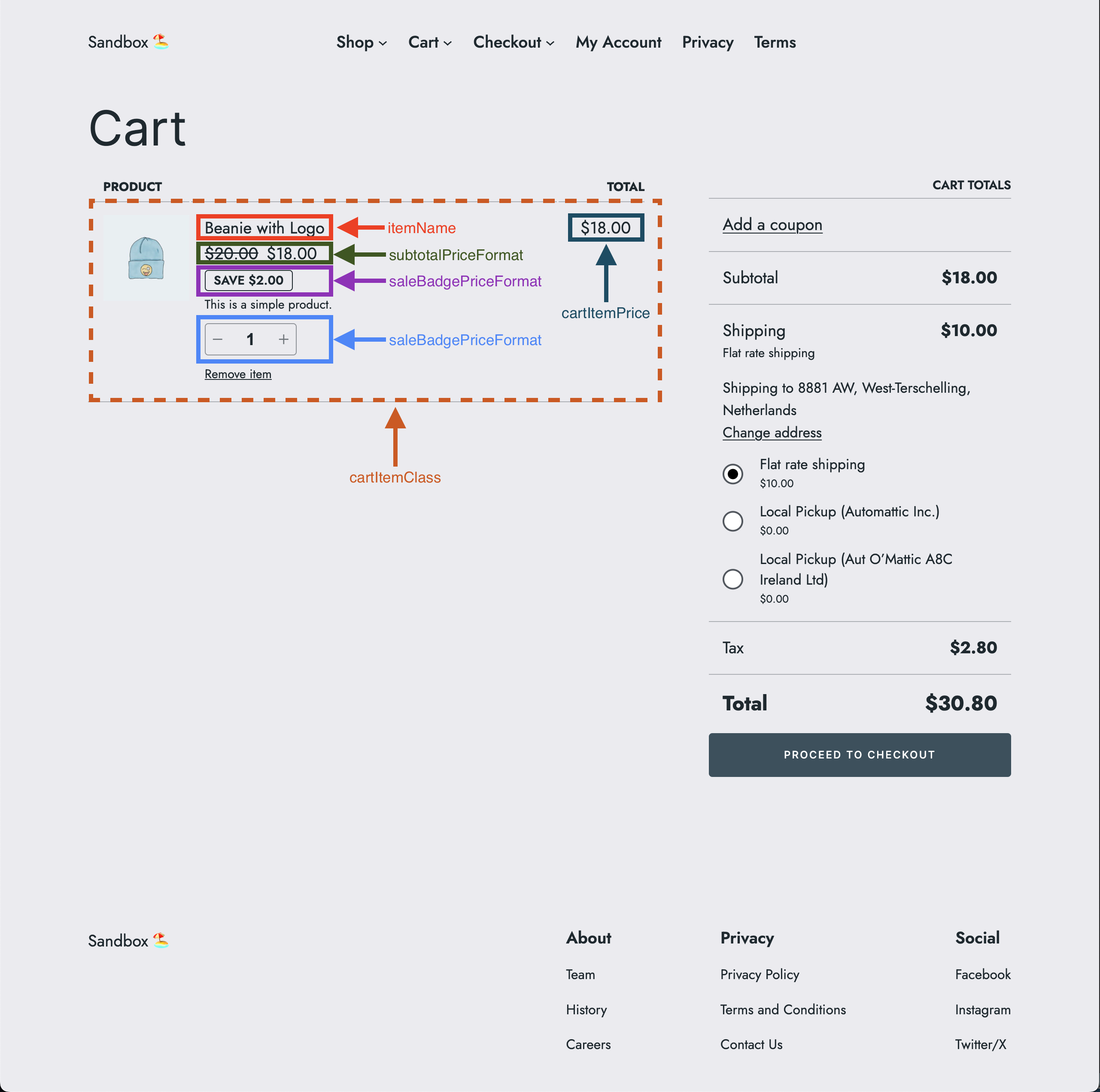
cartItemClass
Description
The cartItemClass filter allows to change the cart item class.
Parameters
- defaultValue
object(default:'') - The default cart item class. - extensions
object(default:{}) - The extensions object. - args
object- The arguments object with the following keys:- cart
object- The cart object fromwc/store/cart, see Cart object. - cartItem
object- The cart item object fromwc/store/cart, see Cart Item object. - context
string(allowed values:cartorsummary) - The context of the item.
- cart
Returns
string- The modified cart item class, or an empty string.
Code examples
Basic example
const { registerCheckoutFilters } = window.wc.blocksCheckout;

const modifyCartItemClass = ( defaultValue, extensions, args ) => {
	const isCartContext = args?.context === 'cart';

	if ( ! isCartContext ) {
		return defaultValue;
	}

	return 'my-custom-class';
};

registerCheckoutFilters( 'example-extension', {
	cartItemClass: modifyCartItemClass,
} );
Advanced example
const { registerCheckoutFilters } = window.wc.blocksCheckout;

const modifyCartItemClass = ( defaultValue, extensions, args ) => {
	const isCartContext = args?.context === 'cart';

	if ( ! isCartContext ) {
		return defaultValue;
	}

	if ( args?.cartItem?.name === 'Beanie with Logo' ) {
		return 'cool-class';
	}

	if ( args?.cartItem?.name === 'Sunglasses' ) {
		return 'hot-class';
	}

	return 'my-custom-class';
};

registerCheckoutFilters( 'example-extension', {
	cartItemClass: modifyCartItemClass,
} );
Filters can be also combined. See Combined filters for an example.
Screenshots
| Before | After |
|---|---|
cartItemPrice
Description
The cartItemPrice filter allows to format the cart item price.
Parameters
- defaultValue
string(default:<price/>) - The default cart item price. - extensions
object(default:{}) - The extensions object. - args
object- The arguments object with the following keys:- cart
object- The cart object fromwc/store/cart, see Cart object. - cartItem
object- The cart item object fromwc/store/cart, see Cart Item object. - context
string(allowed values:cartorsummary) - The context of the item.
- cart
- validation
boolean- Checks if the return value contains the substring<price/>.
Returns
string- The modified format of the cart item price, which must contain the substring<price/>, or the original price format.
Code examples
Basic example
const { registerCheckoutFilters } = window.wc.blocksCheckout;

const modifyCartItemPrice = ( defaultValue, extensions, args, validation ) => {
	const isCartContext = args?.context === 'cart';

	if ( ! isCartContext ) {
		return defaultValue;
	}

	return '<price/> for all items';
};

registerCheckoutFilters( 'example-extension', {
	cartItemPrice: modifyCartItemPrice,
} );
Advanced example
const { registerCheckoutFilters } = window.wc.blocksCheckout;

const modifyCartItemPrice = ( defaultValue, extensions, args, validation ) => {
	const isCartContext = args?.context === 'cart';

	if ( ! isCartContext ) {
		return defaultValue;
	}

	if ( args?.cartItem?.name === 'Beanie with Logo' ) {
		return '<price/> to keep you warm';
	}

	if ( args?.cartItem?.name === 'Sunglasses' ) {
		return '<price/> to keep you cool';
	}

	return '<price/> for all items';
};

registerCheckoutFilters( 'example-extension', {
	cartItemPrice: modifyCartItemPrice,
} );
Filters can be also combined. See Combined filters for an example.
Screenshots
| Before | After |
|---|---|
itemName
Description
The itemName filter allows to change the cart item name.
Parameters
- defaultValue
string- The default cart item name. - extensions
object(default:{}) - The extensions object. - args
object- The arguments object with the following keys:- cart
object- The cart object fromwc/store/cart, see Cart object. - cartItem
object- The cart item object fromwc/store/cart, see Cart Item object. - context
string(allowed values:cartorsummary) - The context of the item.
- cart
Returns
string- The original or modified cart item name.
Code examples
Basic example
const { registerCheckoutFilters } = window.wc.blocksCheckout;

const modifyItemName = ( defaultValue, extensions, args ) => {
	const isCartContext = args?.context === 'cart';

	if ( ! isCartContext ) {
		return defaultValue;
	}

	return `🪴 ${ defaultValue } 🪴`;
};

registerCheckoutFilters( 'example-extension', {
	itemName: modifyItemName,
} );
Advanced example
const { registerCheckoutFilters } = window.wc.blocksCheckout;
const modifyItemName = ( defaultValue, extensions, args ) => {
const isCartContext = args?.context === 'cart';
if ( ! isCartContext ) {
return defaultValue;
}
if ( args?.cartItem?.name === 'Beanie with Logo' ) {
return `⛷️ ${ defaultValue } ⛷️`;
}
if ( args?.cartItem?.name === 'Sunglasses' ) {
return `🏄♂️ ${ defaultValue } 🏄♂️`;
}
return `🪴 ${ defaultValue } 🪴`;
};
registerCheckoutFilters( 'example-extension', {
itemName: modifyItemName,
} );
Filters can be also combined. See Combined filters for an example.
Screenshots
| Before | After |
|---|---|
saleBadgePriceFormat
Description
The saleBadgePriceFormat filter allows to format the cart item sale badge price.
Parameters
- defaultValue
string(default:<price/>) - The default cart item sale badge price. - extensions
object(default:{}) - The extensions object. - args
object- The arguments object with the following keys:- cart
object- The cart object fromwc/store/cart, see Cart object. - cartItem
object- The cart item object fromwc/store/cart, see Cart Item object. - context
string(allowed values:cartorsummary) - The context of the item.
- cart
- validation
boolean- Checks if the return value contains the substring<price/>.
Returns
string- The modified format of the cart item sale badge price, which must contain the substring<price/>, or the original price format.
Code examples
const { registerCheckoutFilters } = window.wc.blocksCheckout;

const modifySaleBadgePriceFormat = (
	defaultValue,
	extensions,
	args,
	validation
) => {
	const isCartContext = args?.context === 'cart';

	if ( ! isCartContext ) {
		return defaultValue;
	}

	return '<price/> per item';
};

registerCheckoutFilters( 'example-extension', {
	saleBadgePriceFormat: modifySaleBadgePriceFormat,
} );
Advanced example
const { registerCheckoutFilters } = window.wc.blocksCheckout;

const modifySaleBadgePriceFormat = (
	defaultValue,
	extensions,
	args,
	validation
) => {
	const isCartContext = args?.context === 'cart';

	if ( ! isCartContext ) {
		return defaultValue;
	}

	if ( args?.cartItem?.name === 'Beanie with Logo' ) {
		return '<price/> per item while keeping warm';
	}

	if ( args?.cartItem?.name === 'Sunglasses' ) {
		return '<price/> per item while looking cool';
	}

	return '<price/> per item';
};

registerCheckoutFilters( 'example-extension', {
	saleBadgePriceFormat: modifySaleBadgePriceFormat,
} );
Filters can be also combined. See Combined filters for an example.
Screenshots
| Before | After |
|---|---|
showRemoveItemLink
Description
The showRemoveItemLink is used to show or hide the cart item remove link.
Parameters
- defaultValue (type:
boolean, default:true) - The default value of the remove link. - extensions
object(default:{}) - The extensions object. - args
object- The arguments object with the following keys:- cart
object- The cart object fromwc/store/cart, see Cart object. - cartItem
object- The cart item object fromwc/store/cart, see Cart Item object. - context
string(allowed values:cartorsummary) - The context of the item.
- cart
Returns
boolean-trueif the cart item remove link should be shown,falseotherwise.
Code examples
Basic example
const { registerCheckoutFilters } = window.wc.blocksCheckout;

const modifyShowRemoveItemLink = ( defaultValue, extensions, args ) => {
	const isCartContext = args?.context === 'cart';

	if ( ! isCartContext ) {
		return defaultValue;
	}

	return false;
};

registerCheckoutFilters( 'example-extension', {
	showRemoveItemLink: modifyShowRemoveItemLink,
} );
Advanced example
const { registerCheckoutFilters } = window.wc.blocksCheckout;

const modifyShowRemoveItemLink = ( defaultValue, extensions, args ) => {
	const isCartContext = args?.context === 'cart';

	if ( ! isCartContext ) {
		return defaultValue;
	}

	if ( args?.cartItem?.name === 'Beanie with Logo' ) {
		return false;
	}

	if ( args?.cartItem?.name === 'Sunglasses' ) {
		return false;
	}

	return true;
};

registerCheckoutFilters( 'example-extension', {
	showRemoveItemLink: modifyShowRemoveItemLink,
} );
Filters can be also combined. See Combined filters for an example.
Screenshots
| Before | After |
|---|---|
subtotalPriceFormat
Description
The subtotalPriceFormat filter allows to format the cart item subtotal price.
Parameters
- defaultValue
string(default:<price/>) - The default cart item subtotal price. - extensions
object(default:{}) - The extensions object. - args
object- The arguments object with the following keys:- cart
object- The cart object fromwc/store/cart, see Cart object. - cartItem
object- The cart item object fromwc/store/cart, see Cart Item object. - context
string(allowed values:cartorsummary) - The context of the item.
- cart
- validation
boolean- Checks if the return value contains the substring<price/>.
Returns
string- The modified format of the cart item subtotal price, which must contain the substring<price/>, or the original price format.
Code examples
Basic example
const { registerCheckoutFilters } = window.wc.blocksCheckout;

const modifySubtotalPriceFormat = (
	defaultValue,
	extensions,
	args,
	validation
) => {
	const isCartContext = args?.context === 'cart';

	if ( ! isCartContext ) {
		return defaultValue;
	}

	return '<price/> per item';
};

registerCheckoutFilters( 'example-extension', {
	subtotalPriceFormat: modifySubtotalPriceFormat,
} );
Advanced example
const { registerCheckoutFilters } = window.wc.blocksCheckout;

const modifySubtotalPriceFormat = (
	defaultValue,
	extensions,
	args,
	validation
) => {
	const isCartContext = args?.context === 'cart';

	if ( ! isCartContext ) {
		return defaultValue;
	}

	if ( args?.cartItem?.name === 'Beanie with Logo' ) {
		return '<price/> per warm beanie';
	}

	if ( args?.cartItem?.name === 'Sunglasses' ) {
		return '<price/> per cool sunglasses';
	}

	return '<price/> per item';
};

registerCheckoutFilters( 'example-extension', {
	subtotalPriceFormat: modifySubtotalPriceFormat,
} );
Filters can be also combined. See Combined filters for an example.
Screenshots
| Before | After |
|---|---|
Cart object
The Cart object of the filters above has the following keys:
- billingAddress
object- The billing address object with the following keys:- address_1
string- The first line of the address. - address_2
string- The second line of the address. - city
string- The city of the address. - company
string- The company of the address. - country
string- The country of the address. - email
string- The email of the address. - first_name
string- The first name of the address. - last_name
string- The last name of the address. - phone
string- The phone of the address. - postcode
string- The postcode of the address. - state
string- The state of the address.
- address_1
billingDataobject- The billing data object with the same keys as thebillingAddressobject.- cartCoupons
array- The cart coupons array. - cartErrors
array- The cart errors array. - cartFees
array- The cart fees array. - cartHasCalculatedShipping
boolean- Whether the cart has calculated shipping. - cartIsLoading
boolean- Whether the cart is loading. - cartItemErrors
array- The cart item errors array. - cartItems
array- The cart items array with cart item objects, see Cart Item object. - cartItemsCount
number- The cart items count. - cartItemsWeight
number- The cart items weight. - cartNeedsPayment
boolean- Whether the cart needs payment. - cartNeedsShipping
boolean- Whether the cart needs shipping. - cartTotals
object- The cart totals object with the following keys:- currency_code
string- The currency code. - currency_decimal_separator
string- The currency decimal separator. - currency_minor_unit
number- The currency minor unit. - currency_prefix
string- The currency prefix. - currency_suffix
string- The currency suffix. - currency_symbol
string- The currency symbol. - currency_thousand_separator
string- The currency thousand separator. - tax_lines
array- The tax lines array with tax line objects with the following keys:- name
string- The name of the tax line. - price
number- The price of the tax line. - rate
string- The rate ID of the tax line.
- name
- total_discount
string- The total discount. - total_discount_tax
string- The total discount tax. - total_fees
string- The total fees. - total_fees_tax
string- The total fees tax. - total_items
string- The total items. - total_items_tax
string- The total items tax. - total_price
string- The total price. - total_shipping
string- The total shipping. - total_shipping_tax
string- The total shipping tax. - total_tax
string- The total tax.
- currency_code
- crossSellsProducts
array- The cross sells products array with cross sells product objects. - extensions
object(default:{}) - The extensions object. - isLoadingRates
boolean- Whether the cart is loading shipping rates. - paymentRequirements
array- The payment requirements array. - shippingAddress
object- The shipping address object with the same keys as thebillingAddressobject. - shippingRates
array- The shipping rates array.
Cart Item object
The Cart Item object of the filters above has the following keys:
- backorders_allowed
boolean- Whether backorders are allowed. - catalog_visibility
string- The catalog visibility. - description
string- The cart item description. - extensions
object(default:{}) - The extensions object. - id
number- The item ID. - images
array- The item images array. - item_data
array- The item data array. - key
string- The item key. - low_stock_remaining
number- The low stock remaining. - name
string- The item name. - permalink
string- The item permalink. - prices
object- The item prices object with the following keys:- currency_code
string- The currency code. - currency_decimal_separator
string- The currency decimal separator. - currency_minor_unit
number- The currency minor unit. - currency_prefix
string- The currency prefix. - currency_suffix
string- The currency suffix. - currency_symbol
string- The currency symbol. - currency_thousand_separator
string- The currency thousand separator. - price
string- The price. - price_range
string- The price range. - raw_prices
object- The raw prices object with the following keys:- precision
number- The precision. - price
number- The price. - regular_price
number- The regular price. - sale_price
number- The sale price.
- precision
- regular_price
string- The regular price. - sale_price
string- The sale price.
- currency_code
- quantity
number- The item quantity. - quantity_limits
object- The item quantity limits object with the following keys:- editable
boolean- Whether the quantity is editable. - maximum
number- The maximum quantity. - minimum
number- The minimum quantity. - multiple_of
number- The multiple of quantity.
- editable
- short_description
string- The item short description. - show_backorder_badge
boolean- Whether to show the backorder badge. - sku
string- The item SKU. - sold_individually
boolean- Whether the item is sold individually. - totals
object- The item totals object with the following keys:- currency_code
string- The currency code. - currency_decimal_separator
string- The currency decimal separator. - currency_minor_unit
number- The currency minor unit. - currency_prefix
string- The currency prefix. - currency_suffix
string- The currency suffix. - currency_symbol
string- The currency symbol. - currency_thousand_separator
string- The currency thousand separator. - line_subtotal
string- The line subtotal. - line_subtotal_tax
string- The line subtotal tax. - line_total
string- The line total. - line_total_tax
string- The line total tax.
- currency_code
- type
string- The item type. - variation
array- The item variation array.