Order summary items
The following Order Summary Items filters are available:
cartItemClasscartItemPricecartItemScreenReaderPriceitemNamesubtotalPriceFormat
The following objects are shared between the filters:
- Cart object
- Cart Item object
The following screenshot shows which parts the individual filters affect:
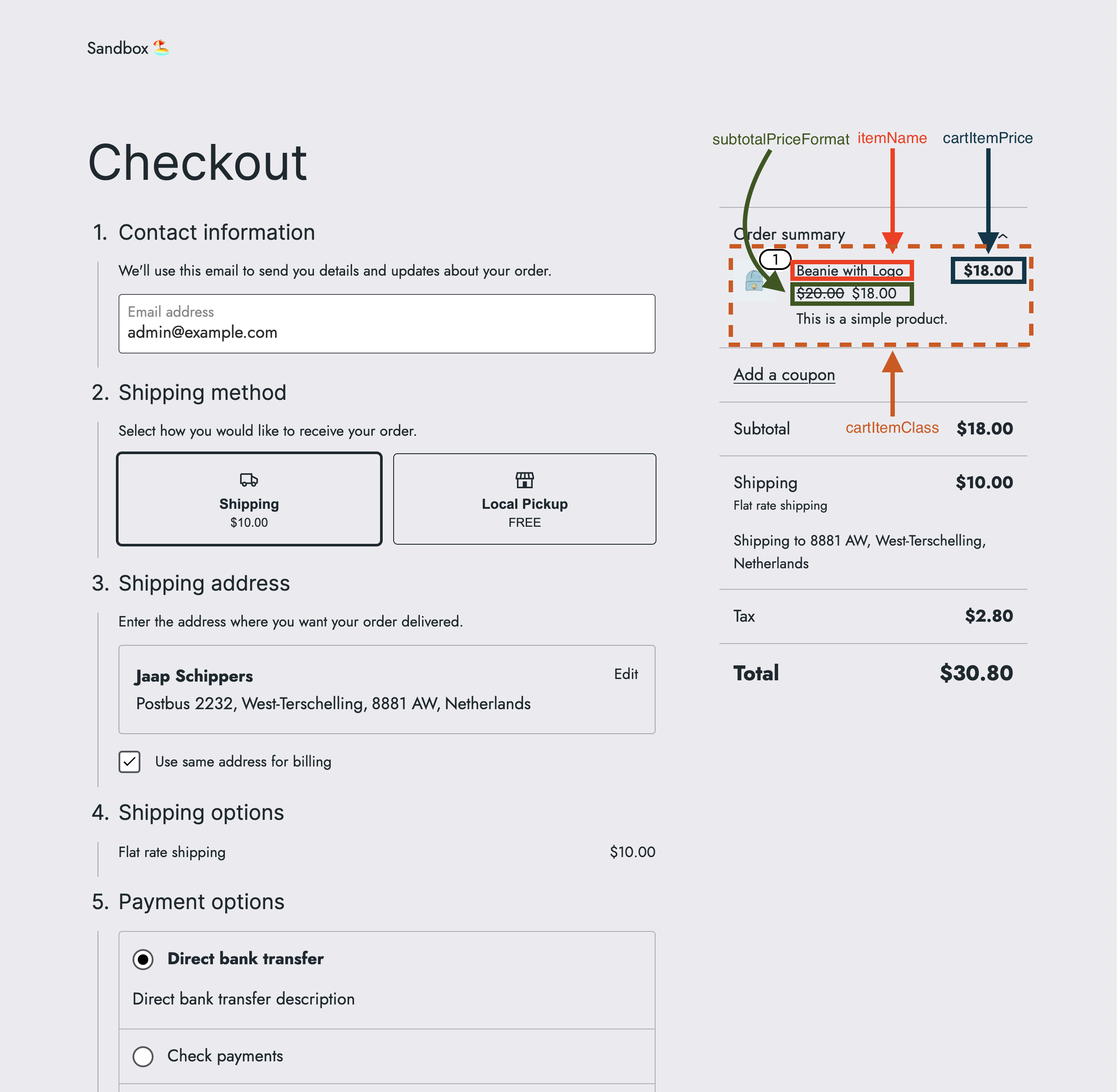
cartItemClass
Description
The cartItemClass filter allows to change the order summary item class.
Parameters
- defaultValue
string(default:'') - The default order summary item class. - extensions
object(default:{}) - The extensions object. - args
object- The arguments object with the following keys:- cart
object- The cart object fromwc/store/cart, see Cart object. - cartItem
object- The order summary item object fromwc/store/cart, see order summary item object. - context
string(allowed values:cartorsummary) - The context of the item.
- cart
Returns
string- The modified order summary item class, or an empty string.
Code examples
Basic example
const { registerCheckoutFilters } = window.wc.blocksCheckout;

const modifyCartItemClass = ( defaultValue, extensions, args ) => {
	const isOrderSummaryContext = args?.context === 'summary';

	if ( ! isOrderSummaryContext ) {
		return defaultValue;
	}

	return 'my-custom-class';
};

registerCheckoutFilters( 'example-extension', {
	cartItemClass: modifyCartItemClass,
} );
Advanced example
const { registerCheckoutFilters } = window.wc.blocksCheckout;

const modifyCartItemClass = ( defaultValue, extensions, args ) => {
	const isOrderSummaryContext = args?.context === 'summary';

	if ( ! isOrderSummaryContext ) {
		return defaultValue;
	}

	if ( args?.cartItem?.name === 'Beanie with Logo' ) {
		return 'cool-class';
	}

	if ( args?.cartItem?.name === 'Sunglasses' ) {
		return 'hot-class';
	}

	return 'my-custom-class';
};

registerCheckoutFilters( 'example-extension', {
	cartItemClass: modifyCartItemClass,
} );
Filters can be also combined. See Combined filters for an example.
Screenshots
| Before | After |
|---|---|
cartItemPrice
Description
The cartItemPrice filter allows to format the order summary item price.
Parameters
- defaultValue
string(default:<price/>) - The default order summary item price. - extensions
object(default:{}) - The extensions object. - args
object- The arguments object with the following keys:- cart
object- The cart object fromwc/store/cart, see Cart object. - cartItem
object- The order summary item object fromwc/store/cart, see order summary item object. - context
string(allowed values:cartorsummary) - The context of the item.
- cart
- validation
boolean- Checks if the return value contains the substring<price/>.
Returns
string- The modified format of the order summary item price, which must contain the substring<price/>, or the original price format.
Code examples
Basic example
const { registerCheckoutFilters } = window.wc.blocksCheckout;

const modifyCartItemPrice = ( defaultValue, extensions, args, validation ) => {
	const isOrderSummaryContext = args?.context === 'summary';

	if ( ! isOrderSummaryContext ) {
		return defaultValue;
	}

	return '<price/> for all items';
};

registerCheckoutFilters( 'example-extension', {
	cartItemPrice: modifyCartItemPrice,
} );
Advanced example
const { registerCheckoutFilters } = window.wc.blocksCheckout;

const modifyCartItemPrice = ( defaultValue, extensions, args, validation ) => {
	const isOrderSummaryContext = args?.context === 'summary';

	if ( ! isOrderSummaryContext ) {
		return defaultValue;
	}

	if ( args?.cartItem?.name === 'Beanie with Logo' ) {
		return '<price/> to keep you ☀️';
	}

	if ( args?.cartItem?.name === 'Sunglasses' ) {
		return '<price/> to keep you ❄️';
	}

	return '<price/> for all items';
};

registerCheckoutFilters( 'example-extension', {
	cartItemPrice: modifyCartItemPrice,
} );
Filters can be also combined. See Combined filters for an example.
Screenshots
| Before | After |
|---|---|
cartItemScreenReaderPrice
Description
The cartItemScreenReaderPrice filter allows for formatting the order summary item price announced to screen reader and assistive technology users. There are no visual changes on the screen. The code changes can be seen in the <span class="screen-reader-text"> included for each item in the cart.
Parameters
- defaultValue
string(default:Total price for <quantity/> <productName/> item: <price/>for purchases of a single item;Total price for <quantity/> <productName/> items: <price/>for purchases of multiple items) - The default order summary screen reader text. - extensions
object(default:{}) - The extensions object. - args
object- The arguments object with the following keys:- cart
object- The cart object fromwc/store/cart, see Cart object. - cartItem
object- The order summary item object fromwc/store/cart, see order summary item object. - context
string(summary) - The context of the item, fixed to match the context of other filters in the mini-cart summary.
- cart
- validation
boolean- Checks if the return value contains the substrings<quantity/>,<productName/>and<price/>.
Returns
string- The modified format of the order summary item price, which must contain the substrings<quantity/>,<productName/>and<price/>.
Code examples
Basic example
const { registerCheckoutFilters } = window.wc.blocksCheckout;
const { _n } = window.wp.i18n;

const modifyCartItemScreenReaderPrice = ( defaultValue, extensions, args, validation ) => {
	const isOrderSummaryContext = args?.context === 'summary';

	if ( ! isOrderSummaryContext ) {
		return defaultValue;
	}

	return _n(
		'<quantity/> <productName/> item will cost <price/>',
		'<quantity/> <productName/> items will cost <price/>',
		args?.cartItem?.quantity ?? 1,
		'example-extension'
	);
};

registerCheckoutFilters( 'example-extension', {
	cartItemScreenReaderPrice: modifyCartItemScreenReaderPrice,
} );
Advanced example
const { registerCheckoutFilters } = window.wc.blocksCheckout;
const { _n } = window.wp.i18n;

const modifyCartItemScreenReaderPrice = ( defaultValue, extensions, args, validation ) => {
	const isOrderSummaryContext = args?.context === 'summary';

	if ( ! isOrderSummaryContext ) {
		return defaultValue;
	}

	if ( args?.cartItem?.name === 'Beanie with Logo' ) {
		return _n(
			'Total price for <quantity/> <productName/> item: <price/> to keep you warm',
			'Total price for <quantity/> <productName/> items: <price/> to keep you warm',
			args?.cartItem?.quantity ?? 1,
			'example-extension'
		);
	}

	if ( args?.cartItem?.name === 'Sunglasses' ) {
		return _n(
			'Total price for <quantity/> <productName/> item: <price/> to keep you cool',
			'Total price for <quantity/> <productName/> items: <price/> to keep you cool',
			args?.cartItem?.quantity ?? 1,
			'example-extension'
		);
	}

	return defaultValue;
};

registerCheckoutFilters( 'example-extension', {
	cartItemScreenReaderPrice: modifyCartItemScreenReaderPrice,
} );
Filters can be also combined. See Combined filters for an example.
itemName
Description
The itemName filter allows to change the order summary item name.
Parameters
- defaultValue
string- The default order summary item name. - extensions
object(default:{}) - The extensions object. - args
object- The arguments object with the following keys:- cart
object- The cart object fromwc/store/cart, see Cart object. - cartItem
object- The order summary item object fromwc/store/cart, see order summary item object. - context
string(allowed values:cartorsummary) - The context of the item.
- cart
Returns
string- The original or modified order summary item name.
Code examples
Basic example
const { registerCheckoutFilters } = window.wc.blocksCheckout;

const modifyItemName = ( defaultValue, extensions, args ) => {
	const isOrderSummaryContext = args?.context === 'summary';

	if ( ! isOrderSummaryContext ) {
		return defaultValue;
	}

	return `🪴 ${ defaultValue } 🪴`;
};

registerCheckoutFilters( 'example-extension', {
	itemName: modifyItemName,
} );
Advanced example
const { registerCheckoutFilters } = window.wc.blocksCheckout;
const modifyItemName = ( defaultValue, extensions, args ) => {
const isOrderSummaryContext = args?.context === 'summary';
if ( ! isOrderSummaryContext ) {
return defaultValue;
}
if ( args?.cartItem?.name === 'Beanie with Logo' ) {
return `⛷️ ${ defaultValue } ⛷️`;
}
if ( args?.cartItem?.name === 'Sunglasses' ) {
return `🏄♂️ ${ defaultValue } 🏄♂️`;
}
return `🪴 ${ defaultValue } 🪴`;
};
registerCheckoutFilters( 'example-extension', {
itemName: modifyItemName,
} );
Filters can be also combined. See Combined filters for an example.
Screenshots
| Before | After |
|---|---|
subtotalPriceFormat
Description
The subtotalPriceFormat filter allows to format the order summary item subtotal price.
Parameters
- defaultValue
string(default:<price/>) - The default order summary item subtotal price. - extensions
object(default:{}) - The extensions object. - args
object- The arguments object with the following keys:- cart
object- The cart object fromwc/store/cart, see Cart object. - cartItem
object- The order summary item object fromwc/store/cart, see order summary item object. - context
string(allowed values:cartorsummary) - The context of the item.
- cart
- validation
boolean- Checks if the return value contains the substring<price/>.
Returns
string- The modified format of the order summary item subtotal price, which must contain the substring<price/>, or the original price format.
Code examples
Basic example
const { registerCheckoutFilters } = window.wc.blocksCheckout;

const modifySubtotalPriceFormat = (
	defaultValue,
	extensions,
	args,
	validation
) => {
	const isOrderSummaryContext = args?.context === 'summary';

	if ( ! isOrderSummaryContext ) {
		return defaultValue;
	}

	return '<price/> per item';
};

registerCheckoutFilters( 'example-extension', {
	subtotalPriceFormat: modifySubtotalPriceFormat,
} );
Advanced example
const { registerCheckoutFilters } = window.wc.blocksCheckout;

const modifySubtotalPriceFormat = (
	defaultValue,
	extensions,
	args,
	validation
) => {
	const isOrderSummaryContext = args?.context === 'summary';

	if ( ! isOrderSummaryContext ) {
		return defaultValue;
	}

	if ( args?.cartItem?.name === 'Beanie with Logo' ) {
		return '<price/> per warm beanie';
	}

	if ( args?.cartItem?.name === 'Sunglasses' ) {
		return '<price/> per cool sunglasses';
	}

	return '<price/> per item';
};

registerCheckoutFilters( 'example-extension', {
	subtotalPriceFormat: modifySubtotalPriceFormat,
} );
Filters can be also combined. See Combined filters for an example.
Screenshots
| Before | After |
|---|---|
Cart object
The Cart object of the filters above has the following keys:
- billingAddress
object- The billing address object with the following keys:- address_1
string- The first line of the address. - address_2
string- The second line of the address. - city
string- The city of the address. - company
string- The company of the address. - country
string- The country of the address. - email
string- The email of the address. - first_name
string- The first name of the address. - last_name
string- The last name of the address. - phone
string- The phone of the address. - postcode
string- The postcode of the address. - state
string- The state of the address.
- address_1
billingDataobject- The billing data object with the same keys as thebillingAddressobject.- cartCoupons
array- The cart coupons array. - cartErrors
array- The cart errors array. - cartFees
array- The cart fees array. - cartHasCalculatedShipping
boolean- Whether the cart has calculated shipping. - cartIsLoading
boolean- Whether the cart is loading. - cartItemErrors
array- The cart item errors array. - cartItems
array- The cart items array with cart item objects, see Cart Item object. - cartItemsCount
number- The cart items count. - cartItemsWeight
number- The cart items weight. - cartNeedsPayment
boolean- Whether the cart needs payment. - cartNeedsShipping
boolean- Whether the cart needs shipping. - cartTotals
object- The cart totals object with the following keys:- currency_code
string- The currency code. - currency_decimal_separator
string- The currency decimal separator. - currency_minor_unit
number- The currency minor unit. - currency_prefix
string- The currency prefix. - currency_suffix
string- The currency suffix. - currency_symbol
string- The currency symbol. - currency_thousand_separator
string- The currency thousand separator. - tax_lines
array- The tax lines array with tax line objects with the following keys:- name
string- The name of the tax line. - price
number- The price of the tax line. - rate
string- The rate ID of the tax line.
- name
- total_discount
string- The total discount. - total_discount_tax
string- The total discount tax. - total_fees
string- The total fees. - total_fees_tax
string- The total fees tax. - total_items
string- The total items. - total_items_tax
string- The total items tax. - total_price
string- The total price. - total_shipping
string- The total shipping. - total_shipping_tax
string- The total shipping tax. - total_tax
string- The total tax.
- currency_code
- crossSellsProducts
array- The cross sells products array with cross sells product objects. - extensions
object(default:{}) - The extensions object. - isLoadingRates
boolean- Whether the cart is loading shipping rates. - paymentRequirements
array- The payment requirements array. - shippingAddress
object- The shipping address object with the same keys as thebillingAddressobject. - shippingRates
array- The shipping rates array.
Cart Item object
The Cart Item object of the filters above has the following keys:
- backorders_allowed
boolean- Whether backorders are allowed. - catalog_visibility
string- The catalog visibility. - decsription
string- The cart item description. - extensions
object(default:{}) - The extensions object. - id
number- The item ID. - images
array- The item images array. - item_data
array- The item data array. - key
string- The item key. - low_stock_remaining
number- The low stock remaining. - name
string- The item name. - permalink
string- The item permalink. - prices
object- The item prices object with the following keys:- currency_code
string- The currency code. - currency_decimal_separator
string- The currency decimal separator. - currency_minor_unit
number- The currency minor unit. - currency_prefix
string- The currency prefix. - currency_suffix
string- The currency suffix. - currency_symbol
string- The currency symbol. - currency_thousand_separator
string- The currency thousand separator. - price
string- The price. - price_range
string- The price range. - raw_prices
object- The raw prices object with the following keys:- precision
number- The precision. - price
number- The price. - regular_price
number- The regular price. - sale_price
number- The sale price.
- precision
- regular_price
string- The regular price. - sale_price
string- The sale price.
- currency_code
- quantity
number- The item quantity. - quantity_limits
object- The item quantity limits object with the following keys:- editable
boolean- Whether the quantity is editable. - maximum
number- The maximum quantity. - minimum
number- The minimum quantity. - multiple_of
number- The multiple of quantity.
- editable
- short_description
string- The item short description. - show_backorder_badge
boolean- Whether to show the backorder badge. - sku
string- The item SKU. - sold_individually
boolean- Whether the item is sold individually. - totals
object- The item totals object with the following keys:- currency_code
string- The currency code. - currency_decimal_separator
string- The currency decimal separator. - currency_minor_unit
number- The currency minor unit. - currency_prefix
string- The currency prefix. - currency_suffix
string- The currency suffix. - currency_symbol
string- The currency symbol. - currency_thousand_separator
string- The currency thousand separator. - line_subtotal
string- The line subtotal. - line_subtotal_tax
string- The line subtotal tax. - line_total
string- The line total. - line_total_tax
string- The line total tax.
- currency_code
- type
string- The item type. - variation
array- The item variation array.