

Subscriptions are the lifeblood of successful businesses, building relationships with their customers and establishing a recurring, sustainable income stream. It’s important that merchants can trust that their subscriptions are working as expected — and when something isn’t, that they have the tools to see it and act on it.
Today we’re shipping a new Subscriptions Health Check tool in WooCommerce Subscriptions. It gives every merchant running Subscriptions a surface for asking a simple question: which of my subscriptions might not be renewing as expected? The tool is available to every store running Subscriptions, regardless of whether any specific bug affected them.
The rest of this post covers why we’re shipping this now, how it works, what we investigated along the way, and what we’re doing differently going forward. If you just want to run the tool, skip to “How to use it”.
Why we broadened the tool
While we already had this tool on our roadmap, we accelerated work on it after a public report highlighting the impact of four bugs that could have put subscriptions into an unexpected non-renewal state. Thanks, Sybre Waaijer for surfacing this. We investigated each of those and shipped the remaining fix this week (details below). But while we were scoping the detection work, we realised that a subscription stuck in this state is a problem regardless of what caused it.
Bugs are one path to that outcome. A merchant admin toggling a setting is another. A gateway change, a token deletion, an import from another platform, a custom plugin, a third-party integration — all can produce the same observable state: a subscription in the store that could be auto-billing, but isn’t. Merchants are the only ones with enough store-specific context to tell those cases apart. So instead of building a narrow “find our bug victims” detector, we broadened the tool to surface all manual-renewal subscriptions that could be running on auto-renewal based on their payment method, as well as subscriptions that might be not have renewed as expected, and let the merchant (or someone acting on their behalf) review them.
How to use it
The tool lives under WooCommerce > Status > Subscriptions. A status card on the Subscriptions Status page also shows when the last scan ran and whether one is currently due.
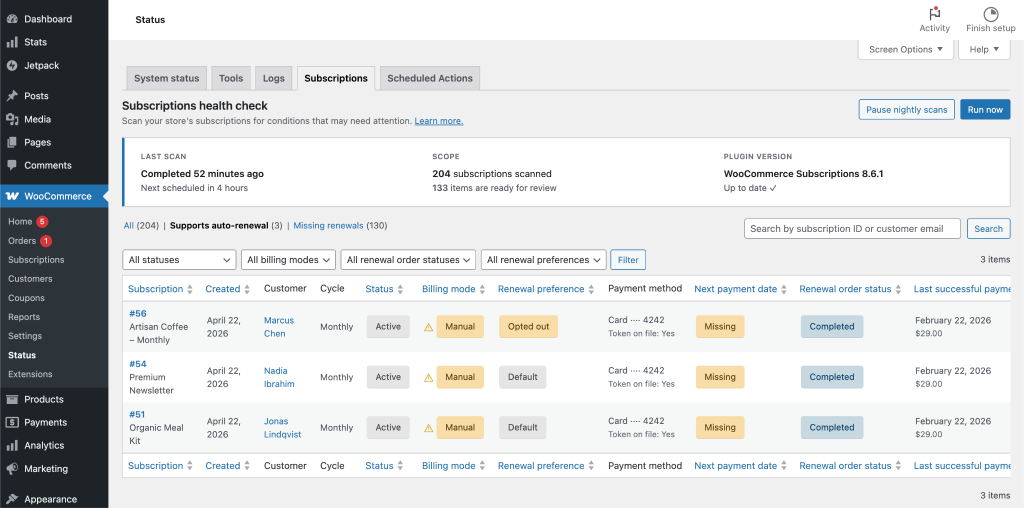
You may trigger a scan immediately with the “Run now” button. Scans process your subscriptions in batches and include throttling to avoid overloading your server or database.
If nightly scans are enabled in WooCommerce > Settings > Subscriptions, the tool runs on its own nightly schedule and stores each run’s results. That means opening the page pulls up the latest scan’s data — you’re not waiting on a long query each time. If a scheduled run fails repeatedly, a circuit breaker backs the tool off and tells you on the Status page so you can investigate rather than silently retrying forever.
When you open the tool, you’ll see three tabs:
- All — every subscription in the store, for when you want a broader view.
- Supports auto-renewal — subscriptions on your store currently flagged for manual renewal where the customer also has a saved payment token on a gateway that supports automatic billing. These are the ones most likely to warrant review.
- Missing renewals – shows active or on-hold subscriptions that are not set to expire after the current cycle and have an empty next payment date or have a next payment date in the past with no matching renewal order (within a ±24 hour window). The former are subscriptions that are expected to renew but won’t because there’s a missing next payment date, the latter are subscriptions that were expected to renew, but didn’t because no matching renewal order was created. There are different potential causes for either condition to happen including potential plugin/custom code conflicts, server/migration issues, or scheduled actions not running.
How a subscription ends up on the “Supports auto-renewal” list
The tool does a single binary decision per subscription. A subscription appears on the list when all of these are true:
- Status is active, on-hold, or pending-cancel
- _requires_manual_renewal is true
- A payment method is set
- That gateway supports subscriptions / automatic recurring payments
- The customer has at least one saved payment token on their account for that gateway
Everything else (opt-out notes, import-as-manual notes, store-wide “turn off automatic payments” settings, prior renewal history) is displayed alongside the subscription rather than used to pre-filter it. That’s a deliberate choice. Merchants have too much store-specific context for us to guess correctly on their behalf whether a flagged subscription is a real problem or a legitimate manual renewal.
How a subscription ends up on the “Missing renewals” list
Active or on-hold subscriptions appear on the “Missing renewals” list when one of these is true:
- The next payment date is empty, unless the sub is set to expire after the current cycle
- The next payment date is in the past with no matching renewal order within a ±24-hour tolerance window
What the tool shows per row
- Subscription — ID and link to the subscription edit screen.
- Created — creation date.
- Customer — name and link to the user page.
- Cycle — the billing cycle for the subscription.
- Status — the subscription’s current status.
- Billing mode — manual or automatic.
- Renewal preference — whether the subscriber opted out of auto-renewal via the My Account toggle or whether no preference has been recorded.
- Payment method — the gateway and method currently associated with the subscription.
- Next payment date — the subscription’s next payment date.
- Renewal order status — status of the most recent renewal order (pending, processing, on-hold, completed, canceled, refunded, or failed).
- Last successful payment — when the subscription last successfully charged, if ever.
Subscriptions that were imported as manual from another platform are tagged as such when we can detect the import note, so you can distinguish them at a glance without us hiding them from the list.
Filters you can use
- Status — narrow to a specific subscription status.
- Billing mode — narrow to auto or manual subscriptions.
- Renewal order status — narrow by the status of the last renewal order.
- Renewal preference — show only subscribers who opted out of auto-renewal via the My Account toggle.
- Search — by subscription ID or customer email.
Columns are sortable; by default, the list is ordered newest-first.
What it deliberately doesn’t do
- It doesn’t change the subscription without your explicit action. Only you, the merchant, have the context to decide whether a flagged subscription is a real problem or a legitimate manual renewal on your store.
- It doesn’t pre-filter legitimate manual subscriptions. The tool doesn’t automatically exclude subscribers who had opted out of auto-renewal, subscriptions imported as manual from another platform, and stores running with “Turn off Automatic Payments” enabled store-wide. Instead, it surfaces all of those but tags them clearly so you can see what’s going on. Same reasoning: your store, your call.
- It doesn’t try to detect every possible category of subscription problem. This first version focuses on the auto-renewable-but-flagged-manual and missing renewals population. Other categories are on the list for follow-on iterations.
What we investigated
Some transparency about what we found when we investigated the public report: Four distinct bugs were called out, all four were real, and three were already fixed in previous releases; the fourth shipped this week. But the bugs don’t all have the same scope or the same impact, and the public discussion has treated them as equivalent in ways that overstate the picture. Any subscription affected by any of these will be surfaced in the Health Check tool if it’s still in an active billing state, alongside anything else causing the same observable state on your store.
The four bugs
*Note: “HPOS” is an acronym for High Performance Order Storage.
Bug 1 — Stale HPOS cache (fixed in WCS 6.1.0, March 28, 2024). On HPOS stores, save_dates() didn’t clear the OrderCache after writing new dates. Any subsequent read of that subscription within the same request or a near-concurrent one, could return a pre-update copy. The fix adds three lines to the HPOS data store: when dates are saved, the cache is invalidated. CPT-only stores were never affected; wp_update_post() and update_post_meta() self-invalidate.
Bug 2 — Missing HPOS backfill methods (fixed in WCS 5.7.0 and 5.8.0, November–December 2023). On stores running HPOS and data-sync (compatibility) mode, missing get_schedule_* and set_schedule_* methods caused WooCommerce core’s reflective backfill to skip subscription schedule metadata. Schedule fields — _schedule_next_payment, _schedule_end, and so on — could diverge between wp_wc_orders_meta and wp_postmeta. This is a different failure class from the other three. It doesn’t flip subscriptions to manual at checkout; it corrupts when renewals fire on existing subscriptions migrated during a narrower window (roughly August through December 2023). The _requires_manual_renewal flag is not directly on the meta keys the Bug 2 fix targeted. Whether the broader backfill issue could have collaterally affected it remains an open question, not a confirmed pathway.
Bug 3 — Re-fetch discarded configured state (fixed in WCS 6.3.0, May 9, 2024). wcs_create_subscription() ended with a wcs_get_subscription() re-fetch to return a “fresh” copy. On HPOS, that re-fetch went through the OrderCache. On high-throughput stores behind database load balancing, it could also hit a read replica that hadn’t caught up and return false, producing fatal errors — the failure mode that originally motivated the fix. The fix drops the re-fetch entirely and returns the in-memory object.
Bug 4 — Same-gateway switch recovery gap (fixed in WCS 8.6.1, April 23, 2026). When a subscriber upgraded or downgraded on the same payment gateway, the switcher’s maybe_set_payment_method_after_switch() recovery path was guarded on gateway-ID change. That guard is partly intentional; it preserves a subscriber’s deliberate choice to renew manually, but it also prevents subscriptions that had been incorrectly flagged manual by Bugs 1 or 3 from self-healing through a plan change. A recovery gap, not a root cause. It doesn’t create broken subscriptions on its own. 8.6.1 also fixes a related issue in the other direction: before the patch, changing a subscription’s payment method or switching the subscription product could silently flip a manual-renewal subscription back to automatic, overriding subscriber intent. Both flows now respect the subscriber’s existing preference when the merchant has enabled the “Display the auto renewal toggle” setting.
How Bugs 1 and 3 combined to mint subscriptions on manual
The “set to manual at checkout” outcome needs Bugs 1 and 3 together on an HPOS store. Bug 1 leaves the OrderCache inconsistent after every checkout’s update_dates() call. Bug 3’s re-fetch, plus any other code in the same request that reads the subscription back through cache, can return that inconsistent copy. Setters applied in memory after such a read can then be no-op’d at save time, because the save path diffs against the stale baseline. The net effect is that _requires_manual_renewal is left at its default value of true in the database even though the checkout code intended to clear it.
Critically, fixing either bug alone substantially closed the pathway. A store running WCS 6.1.0 through 6.2.x — Bug 1 fixed, Bug 3 still present — has the dominant source of cache inconsistency closed. The concentrated risk was HPOS stores on WCS below 6.1.0.
Practical exposure window. HPOS was available as an experimental opt-in from WooCommerce 7.1.0 on November 8, 2022, and became stable and default for new stores in WC 8.2 on October 10, 2023 — which is when adoption actually ramped. Bug 1’s fix shipped on March 28, 2024. The concentrated window is therefore roughly October 2023 through March 2024, with a narrow tail to May 9, 2024 for stores that hadn’t yet updated to WCS 6.1.0. Any subscription created after the store updated to WCS 6.3.0 (May 2024) or later is not affected.
A note on “silent”
Once _requires_manual_renewal is incorrectly set to true by Bug 1 or Bug 3, the subscription behaves identically to one that was intentionally configured for manual renewal. At the first renewal date, WC_Subscriptions_Manager::process_renewal() puts the subscription on hold, creates a pending renewal order, and fires the Customer Renewal Invoice email — which is enabled by default on roughly 91.8% of stores, based on the data we have from stores opted in to tracking.
On most affected stores, the subscriber received that email prompting them to pay manually. The merchant typically didn’t. If the subscriber ignored the invoice, the subscription stayed on-hold and no further renewal events fired until (and unless) they paid, so most affected subscribers received one notification, not a recurring stream. That’s a real problem, and the one the health check tool will surface, but it’s a different problem from payments failing with no record anywhere, which is how some of the public framing has landed.
Note: Bug 2 is the exception here: on the narrow cohort it affected, schedule corruption could have prevented the renewal event from firing in the first place, leaving no record. Subscriptions affected by this bug are now surfaced in the health check tool.
A note about Manual renewals
Manual renewal is a supported, intentional payment mode in WooCommerce Subscriptions. Bank transfers, certain APMs like Multibanco, and customer-controlled billing all run on it by design. Some merchants enable it store-wide. Some subscribers choose it when the merchant allows it. In the initial release of the tool, it deliberately will not auto-fix subscriptions — only the merchant has the full store context to tell a bug-caused manual renewal from an intentional one. We are investigating ways to enable auto-healing and/or better “one-click” actions for correcting subscriptions in future iterations of the tool. But we’re erring on the side of caution for this initial release.
What we’ve done since the report
When the public report surfaced, we ran diagnostic queries across the stores we directly manage on our own infrastructure, and we’ve will reach out to merchants whose stores surfaced potentially-affected subscriptions. If your store is on our hosting and you hear from us about this, that’s why. Because we have direct access to stores on our managed hosting, we can run this kind of diagnostic and reach out proactively rather than waiting for merchants to use the tool we’re providing.
So far, what we’ve found on those stores doesn’t match the scale of impact suggested in the public coverage. However, our focus remains on helping all stores get better visibility into the health of their subscriptions, including those not affected by these bugs.
For every merchant running WooCommerce Subscriptions on their own hosting, the Subscriptions Health Check tool is how you get the same visibility on your own store — the subscriptions that could be auto-renewing but aren’t, for any reason. Our support team is on deck specifically to help you understand what the tool surfaces and decide what to do about it.
What the changelog missed
The most legitimate question in the public coverage is why Bugs 1–3 weren’t communicated more clearly when they were fixed. It’s fair, and it deserves a straight answer.
When those bugs were identified, they were understood internally as High Performance Order Storage (HPOS) compatibility issues — cache invalidation and data sync problems surfaced while implementing HPOS support. We didn’t draw the line from “stale cache bug” to “subscription could be stuck on manual renewal at checkout.” The changelog entries were technically accurate, but didn’t surface the merchant impact.
This wasn’t a decision to downplay anything. It was a process gap. We’ve changed how we assess downstream merchant impact when shipping fixes going forward, and how we communicate it. When a bug fix has a plausible downstream effect on merchant revenue or customer-facing behaviour, it should say so in the changelog — and where it warrants, the fix should come with direct outreach to the merchants most likely to be affected.
Building from here
The Health Check tool is the first version of what we intend to be an ongoing diagnostic layer for WooCommerce Subscriptions. Surfacing other edge cases that have come up in support tickets over the years are on the roadmap too. The filter architecture is deliberately open-ended so we can keep adding categories.
We wrote this as a tool merchants shouldn’t ever have needed, but since the “invisible edge cases” class of issue is never really going to be empty in any complex plugin, we think it’s important to give you the scaffolding to catch them. In the meantime, we will continue to rigorously work to squash those edge cases as we discover them in the plugin to the point where the tool is no longer needed.
While the initial version surfaces the subscriptions that might need action from the merchant (we leave that decision up to stores), it does require users to edit the subscription record itself to handle any changes. The next version – which is already in progress – will offer in context actions that can be taken to handle those subscriptions right from the tool. We’re taking a more careful approach there because of the various usecases for subscriptions across the ecosystem.
Questions
Run the tool now (see documentation here). If anything surfaces that doesn’t look right, or you have questions about what the results mean for your store, reach out to the WooCommerce Support team or leave a comment below. Our support team is on deck specifically for this.
If you ran WooCommerce Subscriptions with HPOS enabled between October 2023 and May 2024, the Health Check tool is where to start. If you started using Subscriptions after May 2024, you’re not affected by the bugs described here — but the tool is still useful for keeping an eye on the ongoing subscription health of your store.
Edit 2026-05-04: Added missing credit to Sybre for the public report.
Leave a Reply