

WooCommerce 10.9 introduces a new experimental, PHP 8.1+ only dual API + GraphQL infrastructure developed as part of Automattic’s Radical Speed Month initiative.
The basic idea
The dual API consists of three components:
- An authoritative code API that takes the form of plain PHP classes decorated with PHP attributes. These classes are either executable (by implementing the command pattern) or DTOs.
- A GraphQL API that’s autogenerated from the code API and mirrors the existing code API classes. Executable classes become queries and mutations, DTOs become input and output types.
- A build script that runs at development time and generates the GraphQL part from the code part.
For example, given the following command class:
#[Name( 'coupon' )]
#[Description( 'Retrieve a single coupon by ID or code. Exactly one of the two arguments must be provided.' )]
#[RequiredCapability( 'read_private_shop_coupons' )]
class GetCoupon {
	public function execute(
		#[Description( 'The ID of the coupon to retrieve.' )]
		?int $id = null,
		#[Description( 'The coupon code to look up.' )]
		?string $code = null,
	): ?Coupon {
		// Retrieve and return the coupon
	}
}…and the following DTO class:
#[Description( 'Represents a WooCommerce discount coupon.' )]
class Coupon {
	use ObjectWithId; //This is a reusable trait

	#[Description( 'The coupon code.' )]
	public string $code;

	#[Description( 'The type of discount.' )]
	public DiscountType $discount_type; //DiscountType is a PHP 8 enum

	#[Description( 'The discount amount.' )]
	public float $amount;

	#[Description( 'The date the coupon was created.' )]
	#[ScalarType( DateTime::class )]
	public ?string $date_created;

	#[Description( 'Product IDs the coupon can be applied to.' )]
	#[ArrayOf( 'int' )]
	public array $product_ids;

	//...and more
}…then you are able to perform the following GraphQL query:
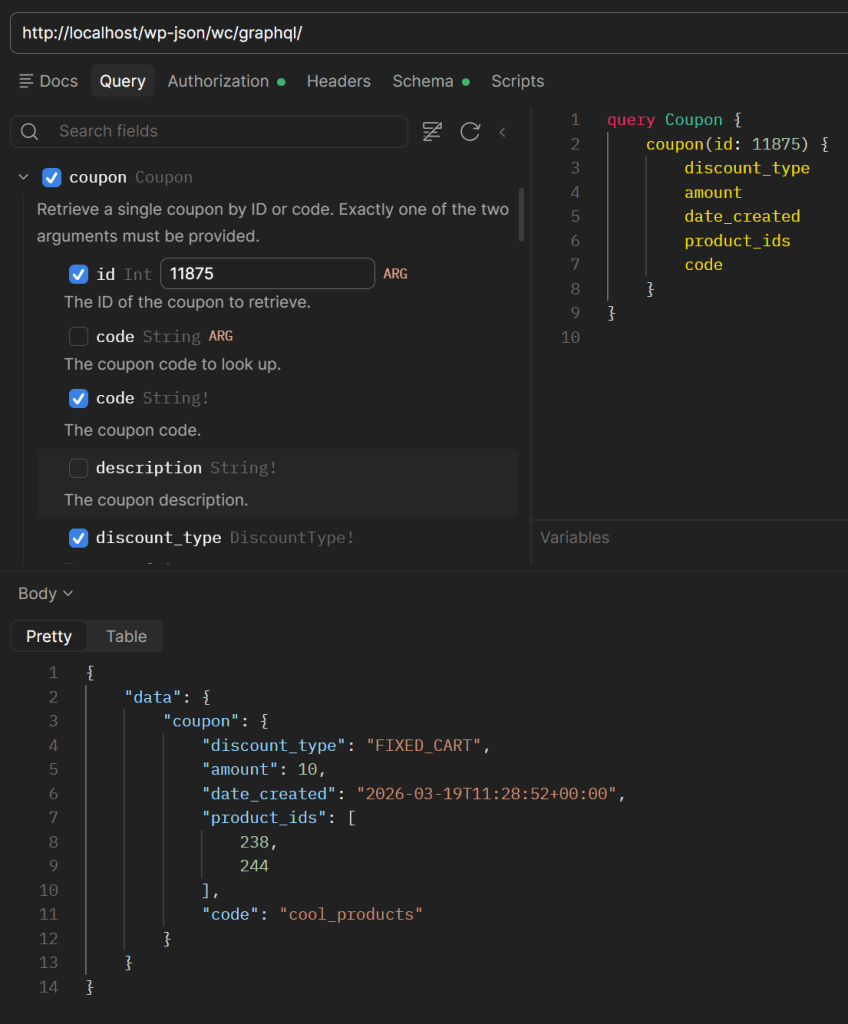
Notice how class and property names and method and property types are automatically converted to their GraphQL counterparts, but the GetCoupon class has a Name attribute that turns the GraphQL query name into coupon. The general rule is: conventions where possible, PHP attributes where conventions aren’t enough (e.g., descriptions) or where an explicit override makes sense (e.g., query and type names).
It’s an API and also an API creator
WooCommerce core contains a a small proof-of-concept API (more on that later) and the infrastructure required to turn that into a GraphQL API. And here’s the interesting part: this infrastructure can be used by WooCommerce plugins to create their own dual APIs! So you define your code classes, run the build script directly from WooCommerce at development time, and you get the GraphQL part directly in your plugin. Then you hook into rest_api_init to register your GraphQL API under the chosen endpoint URL using a provided utility method, and you’re all set.
The core infrastructure contains some utility classes that you can use as-is or replace with custom variants. For example, there’s a class resolver (by default it’s WooCommerce’s standard dependency injection container), a Principal class (a WordPress user) for authentication, and a RequiresCapability attribute for authorization: you are free to use these or to define a custom class resolver or a custom authentication/authorization mechanism.
An example test plugin is provided so you can see how this all works in practice.
Current status: experimental
This is an experimental feature that must be explicitly enabled before being used. We hope to move it to a stable status soon, but in the meantime, we don’t guarantee backward compatibility for either the infrastructure or the core API in future releases. More specifically:
- As for the infrastructure part (the rules for creating code API classes, the attributes and supporting infrastructure classes, and the script that builds the GraphQL part): we hope that it’s stable enough to be usable, but we might need to make adjustments (maybe involving breaking changes) as we test more thoroughly.
- As for the code API part in core: WooCommerce 10.9 will ship with a limited API that covers products and coupons. Please treat this API as a proof of concept: we’ll likely make significant changes to these classes/queries (maybe even replace them with something completely different) in future releases.
Testers wanted
With all that said, you are welcome (and encouraged) to test the new dual API in development or staging environments, either by querying the existing core API or developing your own dual API. If you are willing to take the leap, the documentation on the WooCommerce docs site has all you need to get started (and you can also take a look at the example test plugin). Remember that this feature launches with WooCommerce 10.9 and that it requires PHP 8.1 or newer.
If you want to report bugs or suggest improvements, please head to the dedicated GitHub discussion.
I’m in PHP 7! Am I safe?
Yes. All the PHP 8.1-specific code is in classes that will never run if the feature is disabled or your server runs PHP 7.4 or 8.0, so you shouldn’t see any errors even if you try to enable the feature (the GraphQL endpoint just won’t work). Note, however, that nothing prevents you from using the WooCommerce code API (the classes in src/Api) directly from a custom plugin or code snippet; but of course, in this case you will get errors in PHP 7.4 or 8.0 since these classes are PHP 8.1+ (so please don’t do that).
As for the choice of PHP 8.1, it was motivated by the need for PHP attributes and enums to properly replicate code structures as GraphQL entities and mechanisms. We officially recommend PHP 8.1 or newer for WooCommerce, and while we don’t have a defined roadmap yet, we’ll eventually remove support for PHP 7.4 and 8.0 (with ample advance notice) as we did with older versions; additionally, WordPress 7.0 dropped support for PHP 7.2 and 7.3, and its PHP 8 compatibility is no longer in beta state—so this is a great opportunity to upgrade.
Leave a Reply