

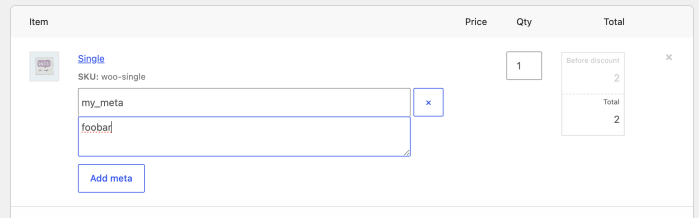
As of WooCommerce 11.0.0, the order items form in the admin order editor no longer attempts to save reserved meta keys entered through its Add meta button, an operation that never worked reliably.
A key is reserved when the order item’s data store lists it as internal meta (e.g. _product_id, _qty, _line_total), or when an extension registers it as hidden via the woocommerce_hidden_order_itemmeta filter.
Why this change
The goal is correctness and consistency: reserved keys are data that WooCommerce or extensions manage, and editing them through a generic form was never safe. Before 11.0.0, the form accepted these keys, with broken results.
Keys backed by a setter, such as _product_id, were silently processed by the item’s setter, where an invalid value could break the order screen and a valid one could partially overwrite data. Any other reserved key was appended as a new meta row even when the item already had one, confusing code that expects a single value.
In no case could the entered value be reviewed or edited afterwards.
What has and hasn’t changed
Reserved keys entered through the Add meta button in the order editor are now skipped when the item is saved. In practice, not much else changes: these keys never showed in the form, and adding one only ever worked when the key was missing, due to a bug.
Everything else stays the same:
- Keys that aren’t reserved save normally, even if they start with
_. Order item meta doesn’t follow rules similar to WordPress protected meta. - Programmatic reads and writes via
add_meta_data(),update_meta_data(), the REST API, WP-CLI, etc. are unchanged. - Order meta (the order’s own custom fields) is unaffected: this change only concerns meta on order items.
For developers
If your extension registers keys in woocommerce_hidden_order_itemmeta those will be skipped not just for rendering, as usual, but now also at save time, failing silently.
If admins are expected to manage a meta key, don’t register it as hidden, or provide a dedicated UI for it, giving them a much clearer flow than raw meta entry.
To keep the key hidden but still let admins set it from the items form, re-apply the submitted value from woocommerce_before_save_order_items as a workaround:
add_action(
	'woocommerce_before_save_order_items',
	function ( $order_id, $items ) {
		if ( ! is_admin() || ! current_user_can( 'edit_shop_orders' ) ) {
			return;
		}

		foreach ( $items['meta_key'] ?? array() as $item_id => $keys ) {
			foreach ( $keys as $row => $key ) {
				if ( '_your_meta_key' === $key ) {
					wc_update_order_item_meta( $item_id, $key, wc_clean( wp_unslash( $items['meta_value'][ $item_id ][ $row ] ) ) );
				}
			}
		}
	},
	10,
	2
);For store owners
If an extension’s documentation asks you to enter a meta key through Add meta and the value doesn’t stick, the extension most likely registers that key as hidden. Until the extension is updated, you can unhide the key with a small snippet, which makes it visible and editable in the order editor:
<?php
add_filter(
	'woocommerce_hidden_order_itemmeta',
	fn( $keys ) => array_diff( $keys, array( '_your_meta_key' ) ),
	9999
);If you have questions about this change, open an issue on GitHub or reach out in the WooCommerce Community Slack.
Leave a Reply