

WooCommerce has spent the last few years investing heavily in the block editing experience for merchants and developers. The only thing missing was an official block theme we could recommend, built specifically for Woo.
Purple, our first official block theme, is back and ready for beta testing. For now, you can access Purple directly on GitHub or view a preview site. After this initial round of testing and feedback, Purple will be made available in the WordPress Theme Directory and the WooCommerce Marketplace for easier automatic updates.
Introducing Purple
Purple is the open source WooCommerce starter theme made by Woo. The theme includes templates for most block-enabled WooCommerce pages, ten color palettes and ten font pairings, and custom styles for WooCommerce and WordPress core blocks. It also includes a pattern library focused on ecommerce with product grids, filters, collections, call-to-actions, product detail pages, and more.
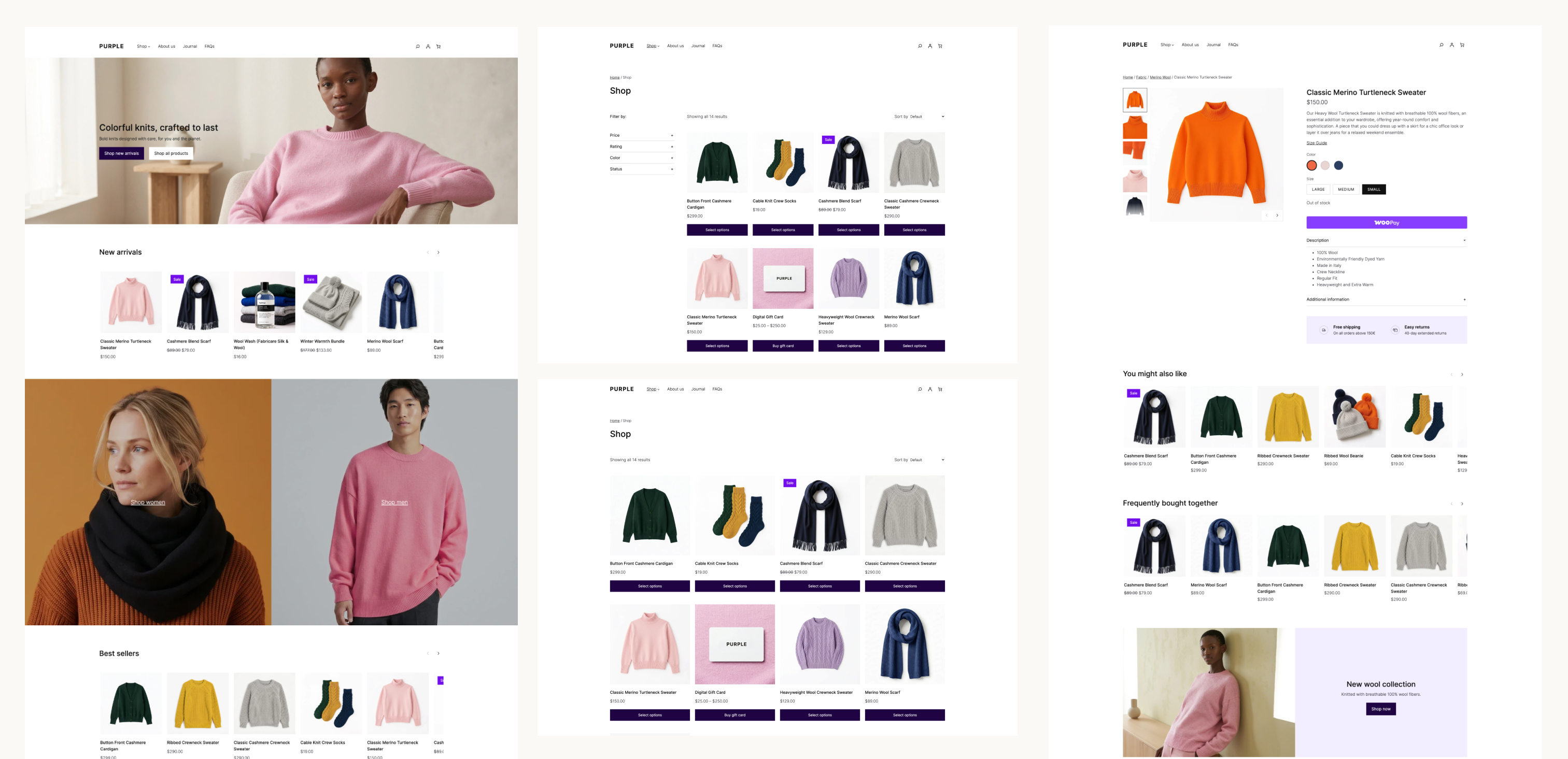
For merchants launching on Woo, Purple is designed to give your store a modern and performant starting point. However, thanks to the customization options built into blocks, developers and agencies can modify and extend the templates and styles and use the theme as a starting point for bespoke store designs.
A year of self-improvement
If you followed the Purple project last year, and the strategy update that paused it, you’re probably wondering what’s changed. Since that time, our team has been improving Woo’s block functionality and performance, contributing upstream to the block editor, and learning from real block-based Woo stores. Along the way, WordPress core has improved the editor, introducing responsive design controls and an improved pattern editing experience.
With everything WordPress and Woo have to offer, a good block theme is intentionally lean and modular. They don’t require the traditional layers of functionality and lock-in that older theme framework typically included.
When you compare Purple to our classic flagship theme, Storefront, you might wonder where all the featured extensions have gone. When using Storefront, you might have needed extensions for product hero designs, custom homepages and product galleries, a mini-cart, or even a more advanced header and footer. With WooCommerce’s block library and the block editor, those customizations are already possible within any block theme, including Purple.
The work is landing in WooCommerce core
The larger project is the work that Purple helped drive in WooCommerce core: more granular style controls in blocks, templates that showcase your product catalog, and an easy path to defining your store’s brand consistently across your site.
The improvements below are a small example of what’s available to any block theme that uses the affected blocks and APIs.
WooCommerce 11.0 made block themes lighter and more consistent
WooCommerce 11.0 established several foundations for the work that followed:
- Pattern content is loaded on demand. WooCommerce registers patterns by file path and loads their content when the editor requests it, reducing work on requests that do not need pattern content (#65922).
- Product images work better with theme settings. The Product Image block uses larger thumbnails and preserves the correct aspect ratio for cropped images (#66191, #66354).
- Product collections compose more reliably. The Product Collection block now keeps the right context when nested inside a Query Loop, so its inner product blocks render correctly in composed templates and patterns (#65637).
- More blocks participate in global styles. The Breadcrumbs block supports
theme.jsonstyling, including custom font sizes (#65460, #65537). - Product filters are easier to compose. The Product Filters block gained an option to disable its filter drawer and fixes synchronization across multiple filter instances (#65671, #65622).
- Cart markup is more accessible. Cart table headers now expose the appropriate ARIA roles and scope attributes for assistive technology (#65364).
WooCommerce 11.1 expanded responsive block styling
WordPress 7.1 introduced responsive design controls for the block editor. WooCommerce 11.1 gives those controls more useful WooCommerce blocks to work with:
- Product Price supports responsive styling for typography, colors, padding, and margins, with the editor and frontend using the same responsive states (#67007).
- Product Reviews now follows the WordPress wrapper used for responsive styling, so review content and the review form can reflect the styles selected for each viewport (#67360).
- Product Details supports padding, margin, background, and border settings through the block and Global Styles (#67409).
- Product Gallery supports custom aspect ratios and keeps the large image area and thumbnail rail in sync (#66441).
The release also completed some initial performance improvements for block registration. WooCommerce skips block and pattern registration for recognized requests that cannot render blocks, making Store API and REST requests 30–42% faster in the published measurements (#65781). This release also introduces experimental support for unified block editor assets while editing your site, with a 48.3% reduction in network transfer size.
WooCommerce 11.2 continues refining the storefront building blocks
WooCommerce 11.2 is still in development, and it contains some of the most visible examples of the theme work moving into core:
- Product Filters has responsive overlay and sticky-positioning controls. The block can stay inline, switch to an overlay on mobile or tablet, or use an overlay at every viewport. The behavior works in the editor and on the frontend, respects the configurable responsive breakpoints in WordPress 7.1, and can keep filters visible as shoppers move through a product catalog (#67696, #68256).
- Product Quantity exposes more styling controls. Text color, background color, border radius, and border and shadow styles can be configured through block styles. Grouped product quantity controls use the same styling model (#68040, #68000, #68148).
- Product images can use theme-defined borders. The Product Image block now supports border styles, giving product grids and collection patterns another way to express a store’s visual system (#68342).
- Chips are more themeable. The Chips block, used by Product Filters and Add to Cart + Options, adds typography and border-radius controls that can be styled consistently with the rest of the store (#68105).
- WooCommerce patterns are easier to find and customize. The inserter category is being renamed from “WooCommerce” to “Shop,” and customized template parts no longer take priority over template parts queried directly (#67874, #67892).
This is just a subset of the most recent work done to improve the block editing experience, but Purple has been a long project, and a key factor in our work to improve the foundations of WooCommerce for all users.
How to test Purple
Please test Purple on a staging or local site. Use the latest version of WordPress and WooCommerce so you can exercise the responsive controls described above.
- Download the latest release or clone the Woo Themes repository.
- Install the
purpledirectory as a theme, either by uploading a zip of that directory or copying it intowp-content/themes. - Activate Purple and open Appearance > Editor.
- Review the front page, Shop or Product Catalog, Single Product, Cart, Checkout, My Account, and search templates.
- Test the Product Filters block at desktop, tablet, and mobile widths. Try the inline and overlay modes, then test a custom
settings.viewportconfiguration. - Test Product Price, Product Details, Product Reviews, Product Gallery, Product Quantity, Catalog Sorting, and Mini-Cart with simple, variable, and grouped products.
- Add your usual extensions and child-theme customizations, then repeat the tests on the frontend and in the editor.
Purple is a beta. Expect the templates, patterns, and styling to continue changing as we learn from testing. Note: when downloading Purple directly from GitHub, it will not receive automatic updates.
Share your feedback
Please open an issue in the Woo Themes repository when you find a problem or have a suggestion. Include the WordPress, WooCommerce, PHP, and Purple versions; the template or block you were testing; the steps to reproduce the problem; and screenshots or a recording when the issue is visual.
Your feedback will help us improve the default WooCommerce storefront and the blocks and templates available to every block theme.
Leave a Reply