

We’re excited to announce another addition to WooCommerce core. The functionality previously offered by the Additional Variation Images extension is being merged into WooCommerce core, available for free, out of the box.
Starting with WooCommerce 10.9, every variation in a variable product can carry its own ordered gallery of images, beyond the single featured image variations have always supported.
This change follows our Brands merge in 9.4 and is part of the ongoing “more in core” initiative: bringing essential commerce features into core so merchants get them by default and developers can focus on differentiated work.
What’s included?
Variation galleries let each variation surface its own images on the storefront. When a shopper picks a variation, the gallery swaps to show that variation’s full image set.
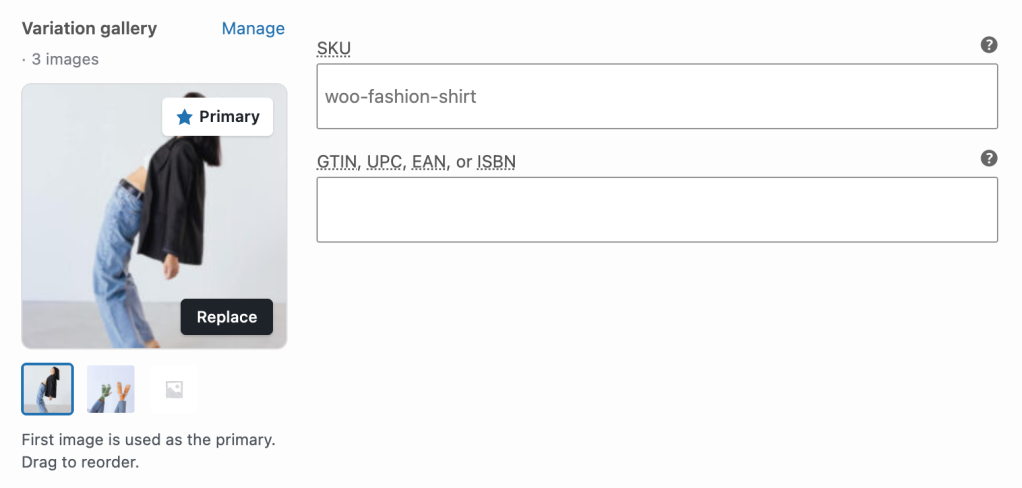
From the admin, a single unified field manages each variation’s images in one place: the variation’s featured image and gallery are presented as one ordered list, with the first item promoted to “primary” automatically.
Enabling the feature
Although we’re adding this feature in WooCommerce 10.9, it will be initially disabled for all users.
To enable variation galleries in a store, you can toggle the “Variation gallery” checkbox from Settings → Advanced → Features.
Alternatively, if you prefer a more programmatic approach, you can always run the following WP-CLI command to enable the feature:
wp option update wc_feature_woocommerce_additional_variation_images_enabled 'yes'
When the feature is enabled, the standalone Additional Variation Images extensions is automatically deactivated to prevent conflicts between the two implementations.
The feature is planned to roll out in phases, to allow ample time for testing, feedback, migration and phasing out of existing Additional Variation Images subscriptions:
- 10.9 ships it for opt-in testing,
- a 5% canary follows in a subsequent release via a DB updater that flips the option for selected stores,
- and finally, 100% enablement lands once the canary clears.
What we focused on in this first cut
We are deliberately keeping this first pass clearly scoped: we prioritized the things that are hard to retrofit later and easy to get wrong:
- A clean migration path. Stores currently running the Additional Variation Images extension move to core without manual intervention, and without data loss if they want to roll back to the extension.
- Backwards compatibility. We are preserving legacy meta on disk, so the runtime fallback keeps un-migrated variations rendering correctly, and theme overrides of the affected templates continue to work.
- Feature parity with the extension. Everything the AVI plugin did, the core implementation does.
- REST API support out of the box. Unlike the Brands merge, which initially shipped without REST endpoints, variation galleries are exposed via the REST API from day one (see below for details).
As such, you might find this first pass of the admin UI still a little rough on the edges. We chose to ship the substantive plumbing first and iterate on UI polish during the rollout, rather than block the merge on a redesign.
Expect follow-up improvements to the variation gallery editor as the feature moves through the canary phases.
Technical implementation
Variation galleries are stored in _product_image_gallery—the same postmeta key WooCommerce already uses for product galleries on parent products.
As mentioned above, we worked to ensure that the galleries are also exposed via the REST API from day one. You can find them via the gallery_image_ids property on the variation endpoint, in the same shape parent products use.
We are already using this payload internally both in the classic storefront path and in the block-based Product Gallery.
For sites currently using the Additional Variation Images extension, legacy data stored in _wc_additional_variation_images is migrated into the canonical location on rollout.
Legacy meta is intentionally preserved on disk, so you can be sure that any third-party code that still reads it directly keeps working.
Migration guide
For sites currently using the Additional Variation Images extension, we’ve ensured a smooth transition path: when the feature is enabled, WooCommerce schedules a background Action Scheduler job that copies legacy gallery data into the canonical location, in batches of 250 variations per run, re-queueing itself until done.
The migration is idempotent, so re-running it on already-migrated variations is a no-op via the sentinel meta. We recommend testing this process on a staging site first, though.
Custom code interacting with _wc_additional_variation_images directly should keep working since the legacy meta is preserved, but anything that wrote to _product_image_gallery on variations may need to be aware that core now reads from it.
Storefront compatibility
Variation galleries work with both the classic single-product template and the block-based Product Gallery in a variety of different combinations, including old and new blocks.
Theme overrides of single-product/add-to-cart/variable.php are supported.
Retiring the standalone extension
The standalone Additional Variation Images extension will be retired from the WooCommerce Marketplace once the feature reaches 100% rollout, following the same playbook we used when retiring the Brands extension.
Concretely, that means:
- No action needed from merchants currently subscribed. The extension keeps working until the core feature is enabled on your store. When that happens, WooCommerce automatically deactivates the standalone plugin to prevent conflicts. Your variation gallery data continues to render: it’s the same data, just served from core now.
- Active subscriptions will be cancelled when the extension is retired from the Marketplace. Affected customers will be able to request a refund or credit from our support team. Full details will go out in the retirement email.
- Affected merchants will receive email notifications at the key rollout milestones (canary and 100%), with instructions and links to documentation.
- Documentation is being migrated to core. The existing Additional Variation Images docs will be redirected to the new variation gallery documentation under the core product docs.
We’ll publish more details—including exact retirement dates, subscription handling specifics, and the documentation move—in a separate communication closer to the 100% rollout.
If you’re an Additional Variation Images subscriber, you don’t need to do anything today; we’ll reach out via email when there’s something for you to do.
Testing the feature
The feature will be part of the upcoming WooCommerce 10.9 beta, scheduled for June 8th, and can be enabled by the snippet or CLI command above. However, if you can’t wait to get your hands on this feature, you can always get it right now in the nightly build on GitHub.
We highly recommend testing this feature on your staging environment.
We’ve kicked off a GitHub Discussion for this topic, and we look forward to learning about your experience and any feedback you share with us.


Leave a Reply