
Improve your product listings with WooCommerce AI Product Advisor

Keeping product listings polished across an entire catalog is one of those tasks that’s easy to put off. Titles, descriptions, categories, tags, variation details โ€” there’s always something that could be tighter, but it’s hard to know where to start or where your time is best spent. Today we’re releasing the first public beta of WooCommerce AI Product Advisor, a plugin that reviews your catalog, identifies the products with the most room to grow, and suggests targeted improvements you can apply in one click.
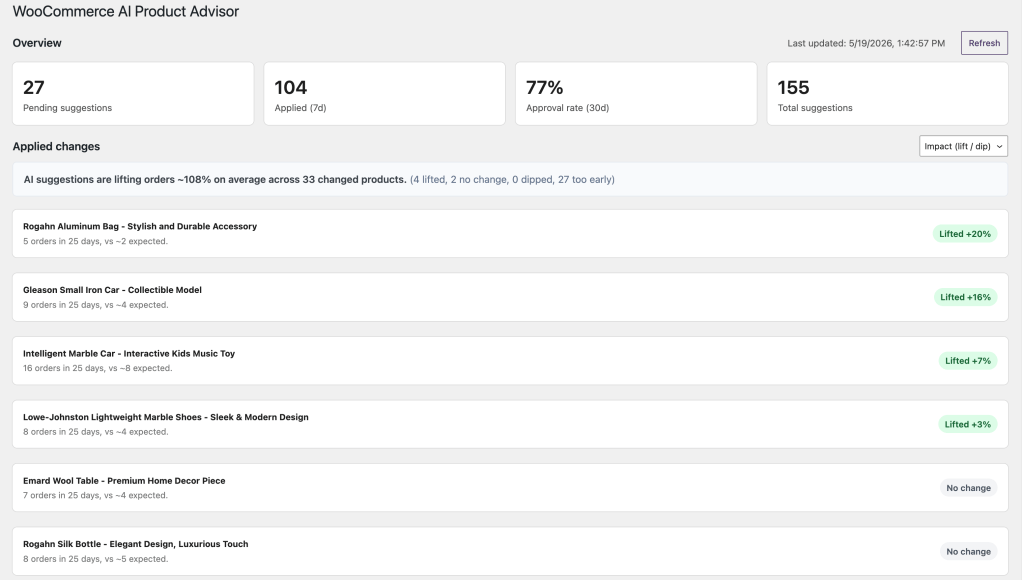
WooCommerce AI Product Advisor – Overview page

This plugin is experimental. We’re releasing it early to learn from real-world usage. Your feedback will directly shape what it becomes.

About AI Product Advisor

AI Product Advisor adds a dedicated screen to your WooCommerce admin. After a short onboarding flow where the plugin analyzes your existing store content, it builds a tone profile so that suggestions match your brand’s voice rather than sounding like generic AI copy. From there, the plugin generates field-level suggestions across titles, descriptions, short descriptions, categories, tags, and variation details.

The plugin gives you three main views to work with:

  • Overview – a dashboard with pending suggestions, your approval rate, and weekly usage. Products where you’ve already applied changes are listed with a local lift/dip indicator showing whether orders moved after the update.
  • Suggestions – a ranked queue of pending improvements. Click into any product for a side-by-side diff with inline editing.
  • History – a full audit log. Every change you’ve accepted can be reverted.

Getting started

  1. Download the plugin ZIP from GitHub.
  2. In your WordPress admin, go to Plugins โ†’ Add New โ†’ Upload Plugin and upload the ZIP.
  3. Activate the plugin and open Product Advisor from the admin menu.
  4. Complete the onboarding flow to connect your store and set up your brand tone.

How to Use:

Where to find more information

Your testing shapes what comes next. If something works well, we want to hear about it. If something doesn’t, we especially want to hear about it.


7 responses to “Improve your product listings with WooCommerce AI Product Advisor”

  1. Aleesha Avatar
    Aleesha

    When I try to connect, “The response is not a valid JSON response.” error message is displaying and not able to connect and proceed

    1. Sergey Mitroshin Avatar
      Sergey Mitroshin

      Hello Aleesha.
      Thanks for trying out the plugin!

      This error usually appears when WordPress.com is unable to parse response from your website – it might be some random output making JSON invalid.

      Can you please share the website URL so I could look into this more thoroughly?

      1. Aleesha Avatar
        Aleesha

        Hi Sergey, the issue was because of some commented lines in the theme file. After deleting those, it works. And its doing a great job

  2. Doesn’t it work with other languages than english? I had it run on my site and got no recommendations. I was wondering because I have products without any description and thought I could get one the easy way.

    1. Sergey Mitroshin Avatar
      Sergey Mitroshin

      Hello Adrian.
      Thanks for giving it a try!

      Yes, you can use the plugin to fill out empty product descriptions based on the data in other fields (product name, categories, tags). And it also preserves the language of product listings, so that shouldn’t be an issue.

      Looks like there was a problem getting your product data into the recommendations pipeline.
      Please reactivate the plugin, and if you are still not seeing any recommendations, let us know and we’ll try to diagnose the issue on our side.

  3. Using it now. So far, so good. However, I had to make a change to the Field Guidelines in Settings that are not appearing in the products that already have suggestions. Is there a way to force the routine again so that the changes made in settings are reflected in the products that already have suggested changes?

    1. Sergey Mitroshin Avatar
      Sergey Mitroshin

      Thanks for the feedback!

      You are raising a good point – “Tone & Feel” changes will take effect in new suggestions, but those already in the queue won’t be affected.
      I’ll make sure we’ll address it in the next release.

Leave a Reply

Your email address will not be published. Required fields are marked *