

One of the most visited WooCommerce docs is our Email Troubleshooting. In over 1% of all of our support interactions, we end up walking someone through it. With all of these touch points, we have uncovered a clear pattern: in order to get clearer data on where an email process is failing, we must test the process with a logging plugin.
Given how critical emails are to any online store, we wanted to simplify the troubleshooting process. WooCommerce 10.9 will bring logging for transactional emails into the core plugin.
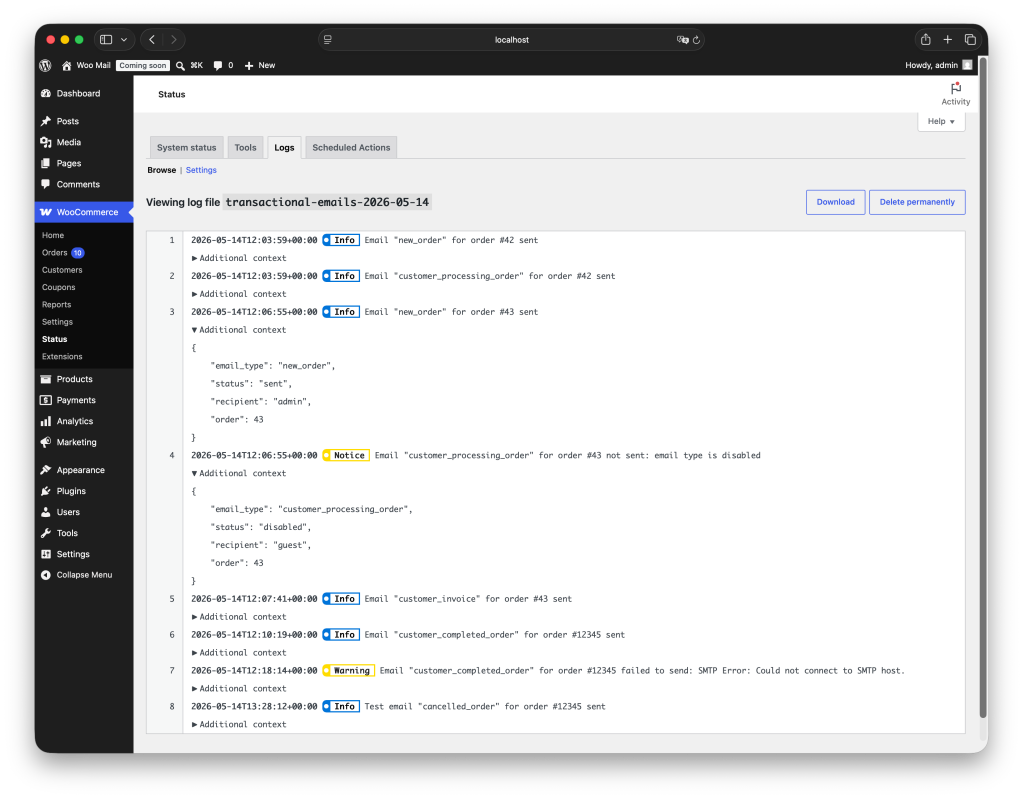
By leveraging the existing logging capabilities of WooCommerce, merchants will be able to see which emails are successfully sent in the log, as well as explicit failure messaging for emails that are registered as unsent.
How it works
There’s a new internal class — EmailLogger — wired into four hooks:
woocommerce_email_sent— fires after every transactional email Woo dispatches, with a success/failure bool and theWC_Emailinstance.woocommerce_email_disabled— fires when Woo deliberately doesn’t send because the email type is disabled in settings.woocommerce_email_skipped— fires when Woo skips a send for a precondition reason (no recipient, etc.), with a short reason identifier.wp_mail_failed— WordPress’s global failure hook. We grab theWP_Errormessage off this so the log entry can include the actual PHPMailer/SMTP reason (“SMTP connect() failed”, “Could not authenticate”, etc).
On each outcome, we write to wc_get_logger() under a new source, transactional-emails. Because it goes through the standard WooCommerce logger, it respects whatever the store has already configured:
- Log handler — file (default,
wp-content/uploads/wc-logs/) or database (WooCommerce > Status > Logs), whichever the store has configured. No new storage layer. - Log level threshold — successful sends log at
INFO, failed sends atWARNING, andNOTICEwhen no send was attempted (disabled/skipped). A store running at error-only in production will only see the failures, which may be exactly what you want. - Retention — same retention controls as everything else in Woo logs, set under WooCommerce > Status > Logs > Settings.
Each entry is a single log line, so storage overhead is negligible even on high-volume stores.
The log entry is structured with three log levels so you can tell at a glance whether something is broken (WARNING), is properly configured (NOTICE), or sent successfully(INFO).
context = [
    'source'     => 'transactional-emails',
    'email_type' => 'customer_processing_order',
    'status'     => 'sent' | 'failed' | 'disabled' | 'skipped',
    'recipient'  => 'jdoe' | 'guest' | 'jdoe, guest',
    'reason'     => 'no_recipient',          // only present when status is 'skipped'
    'order'      => 12345,                   // or 'product' / 'user', when relevant
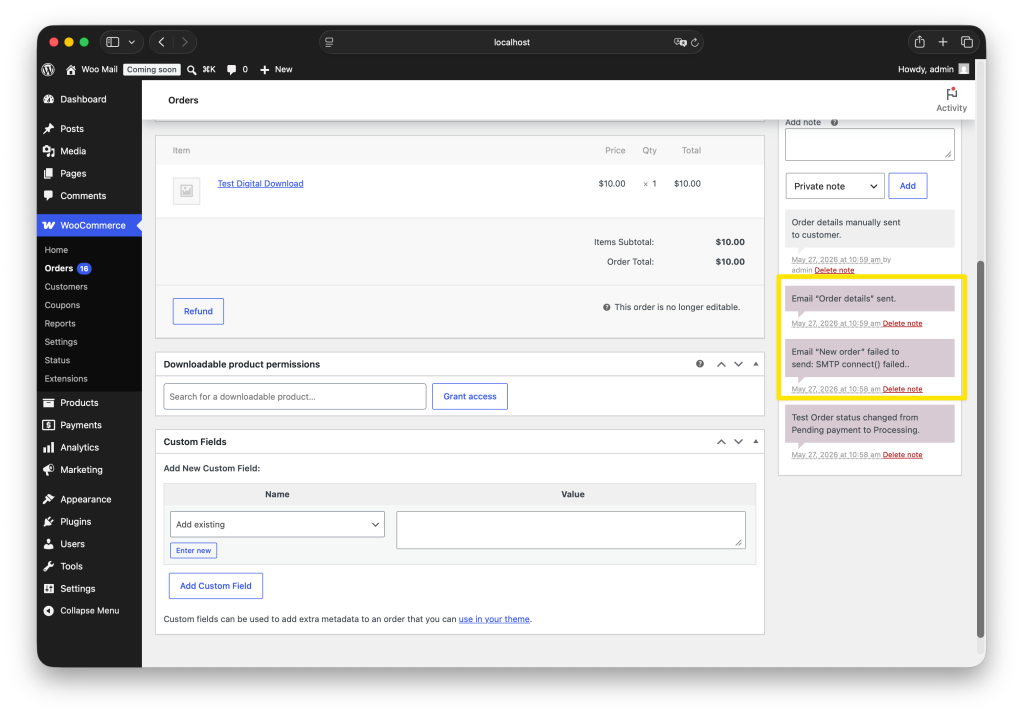
]Next to the log, email breadcrumbs connected to an order are now also available on the individual order notes. Go to WooCommerce > Orders, and select any order to see the transactional emails that have been sent connected to the order, as well as their status. Note that here we opted to only list the emails that Woo attempts to send and whether or not they arrive. So emails disabled in settings or emails skipped because there’s no recipient, do not show at the order level to keep the notes section lean. Our focus is on expected behavior and its outcome.
The below screenshot shows a “new order” email that failed due to an SMTP connect() error, and an “order details” email that was successfully sent.
Other details
Privacy first
Recipient emails are never written to the log. resolve_recipient() maps each address to the matching WordPress username via get_user_by( 'email', … ), or 'guest' if no account matches. For multi-recipient sends (BCC etc.) you get a comma-separated list of labels.
PHPMailer error strings often embed the recipient address inline (“Could not send to foo@example.com“), which would defeat the username mapping, failure messages are run through redact_emails(), a regex scrub that mirrors the one in RemoteLogger::redact_user_data() . This keeps the privacy consistent across loggers.
Object resolution
WC_Email::$object can hold different things: a WC_Order, WC_Product, WP_User, or a custom object from a third-party email class.
get_object_context() converts whatever it gets into a simple, consistent type label: 'order', 'product', or 'user'. It uses these short labels instead of the raw class name so that subclasses group together correctly. For example, a WC_Order_Refund email still logs as order, which keeps your aggregations consistent.
If the object is an unknown class, the method falls back to using the class name directly. To find an ID, it first tries calling get_id() (but only if that method takes no required arguments), and if that doesn’t work, it looks for a public ID property, which covers WP_User-style objects.
Turning it off
You can turn off logging entirely from the WooCommerce admin. Go to WooCommerce > Status > Logs, open the Settings tab, and disable logging there.
If you’d rather keep logging on in general but turn off transactional email logging specifically — for example, to reduce performance overhead, or because you’re already capturing this data in a separate system — you can do that with a filter instead. Return false from the woocommerce_email_log_enabled filter:
add_filter( 'woocommerce_email_log_enabled', '__return_false' );
You can also disable it per email type by inspecting $email_id in the filter, or modify the logged context via woocommerce_email_log_context.
Extension points
WooCommerce 10.9.0 adds two filters for email logging.
woocommerce_email_log_enabled controls whether an email is logged. Return false to skip it, either globally or per type by checking $email_id.
woocommerce_email_log_context controls what gets logged. It passes you the context array before it’s written, so you can add, remove, or change fields. Return the modified array.
Known limitation
wp_mail_failed is a global hook, so it fires for every wp_mail() failure on the site. That creates a narrow edge case: if another plugin’s email fails between a WooCommerce send starting and Woo’s failure hook firing, the captured error could be attributed to the wrong send.
$last_mail_error clears after every WooCommerce send, so stale errors can’t carry forward. The leading edge isn’t bounded, though, so an error can still slip into the window.
In practice this is rare, and it only touches one field.
email_type and status are always accurate. The human-readable failure reason is the only value that isn’t guaranteed accurate, and only when a send actually fails. It’s flagged in the docblock so this doesn’t catch anyone off guard later.
Next steps
Transactional email logging was shipped as part of our work during Radical Speed Month at Automattic. Right now, the focus is on diagnostics. In a next step, we’d love to add a more proactive layer where Woo warns merchants about email errors and helps fix them.
Please leave us your feedback and experience utilizing this feature. We are excited to iterate on this to make email troubleshooting faster and more informative.


Leave a Reply