
Our own newsletter took the site down

A few months ago, at 09:15 UTC we sent a newsletter to around 800,000 people. At 09:18 a colleague pinged to say WooCommerce.com was down. Our monitoring alert arrived at 09:22, four minutes after a human had already noticed (alert latency is a separate topic).

What made it very confusing: nothing shipped that morning, and there was no attack. It turned out that we did this to ourselves with an email campaign 🤯 

Total requests at the edge more than doubled, from roughly a quarter of a million to around 530,000, and fell back almost as fast. By the time that first ping arrived, the site was already recovering. While the infrastructure caught up, some users got 429 Too Many Requests responses. Downtime was around three to four minutes, and even at the peak the vast majority of requests still came back as normal 200s. The failures were mostly those 429 rate-limits, with a thin slice of 5xx. So: a short, partial outage. Still enough to count as a real incident.
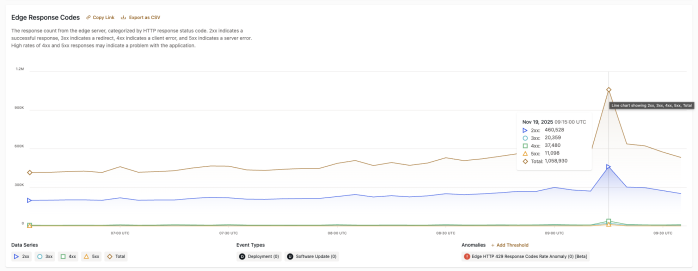
Update (Aug 2026): a commenter noticed the Total line in this chart is exactly double the sum of the visible series. It turned out to be a dashboard bug, since fixed. The real numbers are the per-status lines: peak was around 530k requests against a ~250k baseline. Traffic still roughly doubled, and everything else in the post stands.

The wrong suspects

My first instinct was the usual checklist: a deployment near the incident, an attack-shaped traffic pattern, etc. As mentioned earlier: nothing stood out.

The logs had two odd fingerprints though. The traffic came from datacenter IP ranges and VPNs (AI was fast to find this pattern, it would take me much longer to get this part), not the residential ISPs you see behind real shopper traffic. There was also a burst of JavaScript ChunkLoadErrors: connections that grabbed the HTML and then disappeared, leaving the follow-up JS downloads hanging.

The ChunkLoadErrors were the giveaway: something was pulling each page and cutting the connection before the JavaScript loaded, thousands of times over. That’s what an email security scanner does when it checks a link.

What actually hit us

This newsletter went to store owners. That audience skews heavily toward corporate mailboxes: Office 365, Mimecast, and the like. Those providers run aggressive security scanners that fetch every link in an email the moment it arrives, checking for malware long before a human opens anything.

Delivering 800,000 emails at once meant the scanners arrived all at once too, most of them within seconds of each other. The bulk of that spike was machines. A consumer audience on Gmail would never have generated this. I can’t prove every one of those connections was a scanner, but it’s the only story that fits everything we saw.

Similar spike a week earlier

Sends of this size are routine for us, so this wasn’t some unusually big blast that finally tipped us over. A week earlier we’d sent an even larger campaign that produced a near-identical spike from the same kind of bots, and the site absorbed it without anyone noticing.

So the problem wasn’t really the size of the send, it was the timing. Why that one passed and this one didn’t? Honestly, we can only guess: slightly different bot concurrency, different cache luck on the day.

Why autoscaling lost the race

Our hosting (WordPress VIP) autoscaled correctly, which is a big part of why the outage stayed as short as it did. It would have comfortably carried the extra traffic for as long as it kept coming.

New capacity takes a couple of minutes to come online, and the bot traffic hit in seconds. Autoscaling is built to absorb a gradual ramp, and this arrived as a step function instead: a sudden jump with no slope for the scaling to follow. By the time the new capacity was ready, the spike had already done its damage and mostly passed. The fix had to happen before the traffic ever reached the servers, which meant changing how the email itself went out.
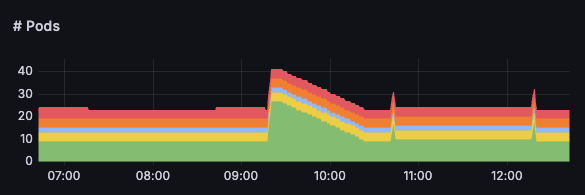
App pods scaling up in response to the traffic spike, then settling back as the burst passed.

What we changed

For the next campaign, we decided to stagger the send instead of delivering the whole list in one burst (check whether your email platform can do this). That next one happened to be Black Friday, a week or so later. It went out in batches over a few hours, and the spike never came.

We didn’t add capacity, and we’re not planning to. Autoscaling already handles natural growth fine, including seasonal peaks. What it can’t do is react in seconds to a self-inflicted spike. A big marketing send is really an infrastructure event, worth coordinating with whoever runs the servers before the largest ones go out.

The takeaway

If you send bulk email to an audience with corporate addresses, your “send” button is a load-testing tool whether you like it or not. The recipients don’t even have to open anything, their mail security fetches every link the moment delivery starts.

We found that out in a couple of minutes one morning. If your list is big enough, or your site is hosted on smaller servers, you might not get even that much warning.

None of this is an argument against emailing your users though, there’s big value in that. Just don’t let the bots surprise you 😉


10 responses to “Our own newsletter took the site down”

  1. Interesting thanks for sharing – but have more questions than answers!

    Do spam systems really load headless browsers that would be triggering JS, or just fetch a body? I find it hard to believe they are running headless browser checks, at a scale and speed that make it viable. And the normal get requests would have been cached at the edge, no?

    Where are the missing 529,000 requests, literally half the peak, that’s completely absent from the breakdown status codes in your chart?

    1. A victim of your own success 😀

      We’ve encountered that issue with a couple clients we’ve consulted for.. once that list hits 75K+ you can definitely DDOS yourself 😀

      1. Michal Iwanow Avatar
        Michal Iwanow

        Yup, it’s especially worth keeping the list size in mind if many of your recipients use business emails with security scanners in front. Good to know we’re not alone 🙂

    2. Michal Iwanow Avatar
      Michal Iwanow

      Mix of both, some scanners really do open links in sandboxes at delivery time, Microsoft calls it URL detonation (https://learn.microsoft.com/en-us/defender-office-365/protection-stack-microsoft-defender-for-office365), most just fetch the HTML. And honestly, I can’t separate scanner ChunkLoadErrors from real users hit by the 429s.

      On caching: campaign links are per-recipient tracking redirects, and even the destination URLs carry a per-recipient token, so to the cache that send was ~800k distinct URLs. Nothing to cache-hit 😔

      And regarding the missing 529k requests: good catch. It turned out to be a chart bug in our hosting dashboard at the time, the Total series was summing a hidden 429-rate series on top of the four visible lines, so it showed exactly double the real count. It was fixed in January, so the current dashboard no longer shows it. I fell for it myself when mentioning numbers in the post 😅 Post is updated now to reflect the actual numbers. Thanks for pointing this out.

  2. Staggering newsletter sending has been a thing for a long time…

    Before CDNs, edge caching and cloud-based autoscaling were common, one’s website could easily be overloaded just by the end users all opening the newsletter at the same time. And the more successful the newsletter, the worse it is for system load 😉

    @ian the request from “benign link scanner” bots can be anything from well-thought-out, indistinguishable-from-a-browser, to downright silly-scraper realm. It is not always easy to classify them as such. We found out f.e. that mobile network operators do the same with http links in sms texts that we send out to customers.
    I don’t remember the exact details, but those requests were bad enough that they would not reach the website, and hence conclude we were spammers, or where happily sending POST requests, triggering actions on behalf of the users before they could even read the message :-O

    1. Michal Iwanow Avatar
      Michal Iwanow

      I get scanners reading the pages, but sending POSTs before the user even reads the message is scary 😬

      And true, staggering has been around for a while. Our sends were even partly staggered already (by recipient timezone), but the large group without timezone data all went out at once, and that turned out to be enough.

  3. Dave Loodts Avatar
    Dave Loodts

    Talking about link scraping, if WooCommerce has some close connection with Meta; ask them to stop scraping WooCommerce shops like crazy too.
    I don’t care if they scrape product or category pages, but Meta scrapes add-to-cart url’s and filter-url’s like crazy.
    The majority of WooCommerce websites on normal (shared) hosting will go down. The only solution we see is Cloudflare, and putting a lot of time in fine-tuning Cloudflare rules.
    Shopify doesn’t have these issues. So, it’s hurting the WooCommerce brand. It’s a waste of scraping energy, Meta probably doesn’t use that data and it makes no sense.

    1. Michal Iwanow Avatar
      Michal Iwanow

      Yeah, that’s the same problem: bots hitting a bunch of URLs that can’t be cached. We’re also seeing it from various AI bots in recent months 😞

      On the Shopify comparison: they own the whole infrastructure, so it’s hard to say whether Meta does something different for them or they just handle it at the server level. A store owner there would never see it either way.

      What can actually be improved on the WooCommerce side is how well stores hold up against this kind of traffic by default, for example not creating a session when a crawler hits an add-to-cart link. Would you mind filing an issue in the WooCommerce repo (https://github.com/woocommerce/woocommerce/issues) describing what you’re seeing from Meta’s crawler, and sharing what you do with your Cloudflare rules? It’ll give the problem a public place where others can +1 and add their data, and your setup could help other Woo merchants in the meantime. I can’t promise when or whether we’d get to it, but real-world reports and +1s are exactly what get something like this prioritized by one of our teams.

  4. Kyle Barrow Avatar
    Kyle Barrow

    A good reminder that batching has benefits beyond just protecting your own infrastructure.

    One example from our own WooCommerce implementation is preorders. When a large shipment arrives, we may need to send many thousands of “your order is now being processed” emails in a relatively short period.

    We’ve found that spreading those emails out is usually invisible to customers, but helps avoid unnecessary spikes in sending volume. Here in Japan, some of the major mobile carriers can be particularly sensitive to sudden bursts of mail from a single sending IP. Once your reputation takes a hit, getting off the naughty list can be surprisingly difficult.

    1. Michal Iwanow Avatar
      Michal Iwanow

      Good point. We were mostly thinking about our own servers being on the receiving end, but batching helps on the sending side too, even when everything holds up fine.

      Interesting to know the Japanese carriers are so sensitive.

Leave a Reply

Your email address will not be published. Required fields are marked *