

Written with @gigitux and @youknowriad
A few weeks ago we shared a proof of concept: WooCommerce’s All Products screen, rebuilt on DataViews and DataForms, the primitives that now ship in WordPress core. That post was about the what. Richer filtering, inline variations, better quick and bulk editing. This one is about the why: what these primitives are really for, who they help, and what it would take to build on them.
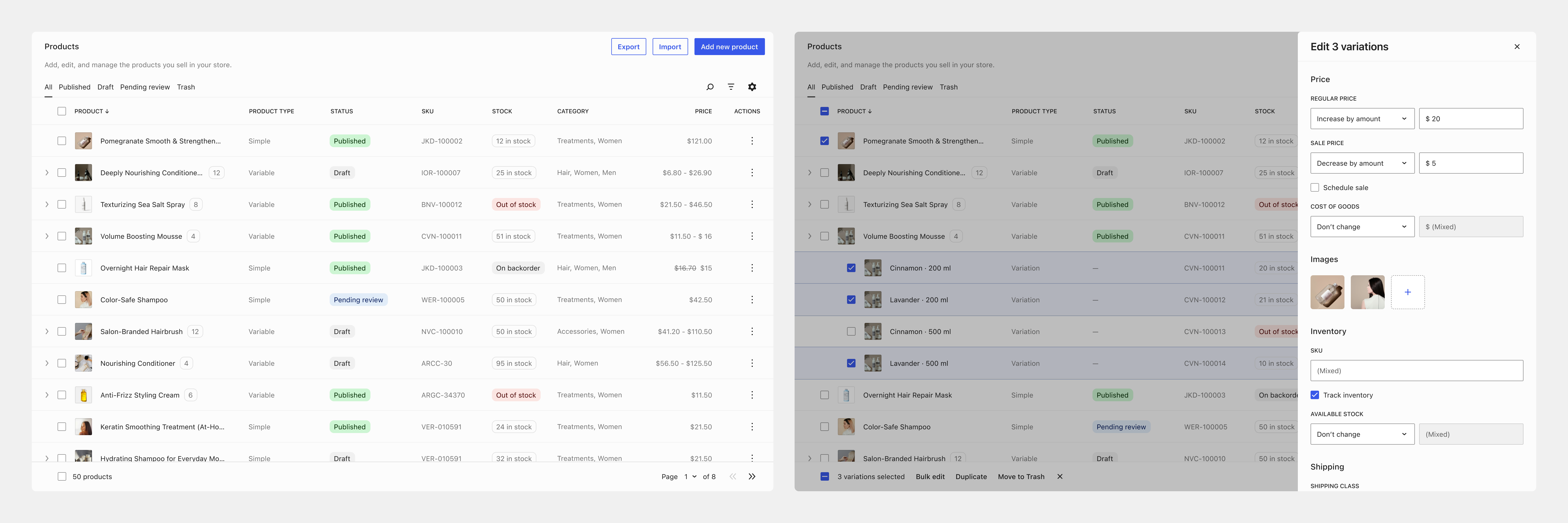
Most of what’s been written about DataViews so far is at the feature level: how to render a dataset, what changed in 7.0. Much less has been said about why they matter, whether they’re the right foundation to build on, and for whom. So that’s what this post tries to do, as honestly as we can, including the parts that are still hard.
What these primitives are
Three pieces that work together, tied by one simple idea: you describe your data once, in plain configuration, and everything else reads from that description.
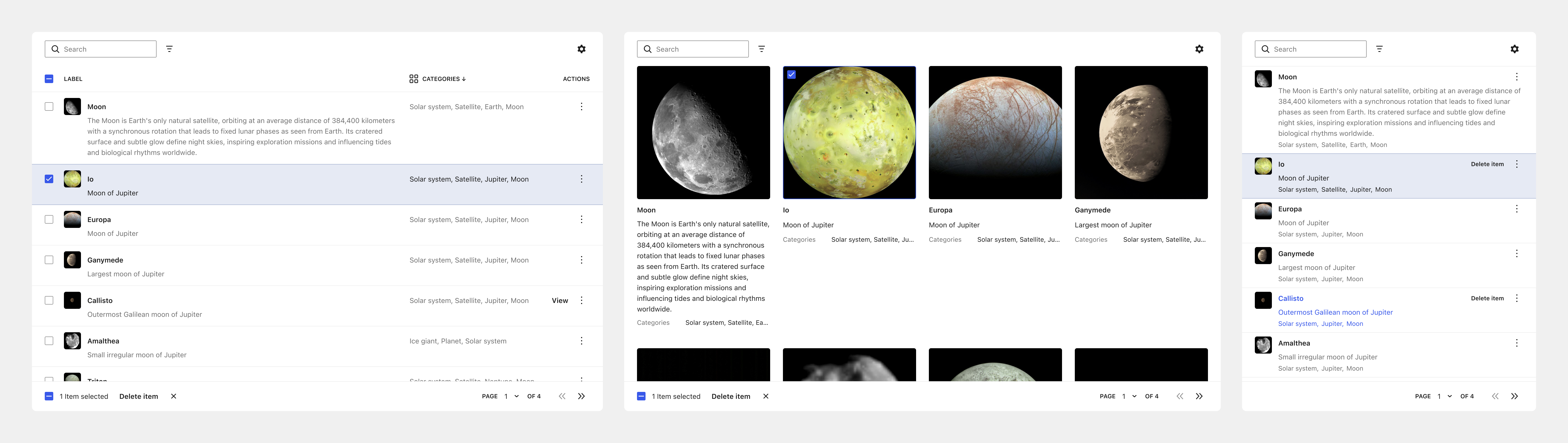
DataViews (shipped in 6.5) shows structured data (as a list, a table, or a grid) and handles searching, filtering, paging, reordering and hiding columns, and row and bulk actions. GitHub #55083 | Storybook
DataForms (shipped in 6.6) is how you create and edit that same data, with built-in field types, controls, and bulk editing. 7.0 added validation, a combobox that scales to hundreds of options, grouping, and density. GitHub #59745 | Storybook
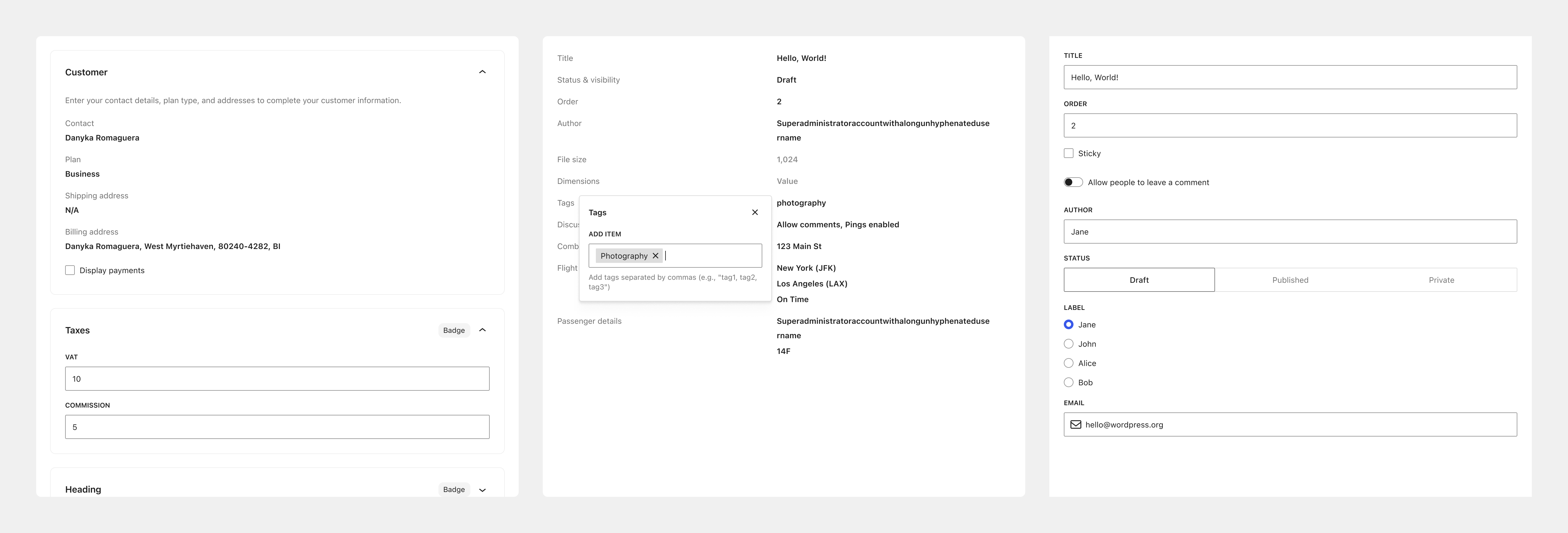
The Fields API is where you define a field once: its type, its format, how it should look, what counts as valid.
WordPress has always been good at describing the shape of content: post types, taxonomies, custom fields. What it never had was a shared way to show and edit that content once it exists. This is that missing piece.
Why not just keep building the way we do today?
First, the argument for not changing anything, because there’s a real one. These screens are old, but they work, and they’ve worked for millions of sites for years. “Don’t touch what works” is usually the right instinct.
But keeping things the same isn’t free. The cost is just spread out, which makes it easy to miss.
The classic model exposes many useful hooks, but they are spread across columns, sorting, queries, Quick Edit, and bulk actions. Extensions often have to combine several APIs with custom JavaScript, and some integrations inevitably become coupled to page markup.
There’s a ceiling, too. Saved views, switching between a table and a grid, filtering without a page reload, a home for review-and-approval workflows, a clean surface for AI to build on. None of these fit naturally into a hand-wired PHP table.
So the real question isn’t “change or keep things the same,” because the status quo isn’t the safe, free option it looks like. It’s whether we keep paying the cost of the current model, a little at a time, forever, or invest together in a shared foundation that lets WordPress and WooCommerce grow more safely. And if you have doubts about that, or aren’t sure DataViews is the right thing to build on, that’s completely fair. We’d love to hear where you’d go instead.
The value and how it compares to the classic screens
The clearest way to see the value is to put each piece next to how the same thing works on the classic screens today.
Describe a field once. One declarative definition (type, format, validation, edit control) powers the list column, the editor, bulk edit, and forms. In WP_List_Table there’s no notion of a field at all: columns, Quick Edit, Bulk Edit, and metaboxes are four separate hand-wired implementations, so a single custom field is rebuilt four times over, untyped and unvalidated.
Let people choose their view. One set of data, shown as a table, a grid, or a list, with density and grouping. Today you get one fixed table and no way to switch. And down the line, extensions will be able to register their own custom views too (GitHub #77413).
Keep the view you set. Filters, sort, and layout stay put instead of resetting on every visit, which is the groundwork for letting people save and name their own views later, and eventually build their own dashboards. Today everything resets to the default each time you land on the page.
Work without the page reloading. Filter, sort, search, and page through data in place over the REST API, with no full reload and no lost scroll position. Today every one of those actions is a full round-trip to the server. DataViews doesn’t update in real time on its own, but because the data is rendered from the API in JavaScript, live-updating views are possible to build on top if you need them.
Improve every screen at once. When screens share the same parts, a fix or an improvement reaches all of them at once. Today each screen is its own island, and good work on one never travels to the rest. It’s also what lets third-party integrations appear in the same, consistent spots and behave like the rest of the admin, instead of every partner building its own one-off UI.
Extend by registering, not patching. The goal is for plugins to register fields, actions, and views declaratively instead of patching a screen’s markup. Today, extensions rely on imperative hooks and custom JavaScript that targets DOM selectors to customize screens. Because those selectors aren’t a stable API, even internal markup changes can break integrations. On top of that, each extension wires itself into the UI independently, with no shared model, increasing the risk of plugins conflicting with one another. A declarative model is what makes those conflicts rare. It’s still being built in the open: a view-config extension point is targeted for WordPress 7.1 (GitHub #76544), with server-side field registration next (GitHub #74865).
Give AI a clean surface. The interesting part isn’t AI doing things. An agent can already change prices in bulk through the API with no interface at all. It’s that when a screen is described as declarative, serializable config instead of hand-built markup, an agent can assemble a sensible dashboard, view, or form that actually fits the rest of the admin. Structure is what makes that coherent. Without it, you just get one more thing that doesn’t match. There’s a related payoff when an assistant acts while you’re watching a screen: ask it to update a batch of prices, and because the screen is rendered from the API, the view can reflect that change instead of going stale, where a classic PHP table would leave you reloading, or patching the DOM by hand in a way that gets fragile once other plugins are in the mix.
Modernize the whole experience. People consistently describe the new experience as modern and on par with the best software they use, while the classic screens feel more dated every year. During the catalog proof of concept, people were excited by the refreshed interface: “The visual design is quite modern, clean, and much more pleasant to use daily… without losing functionality.”
See it in practice
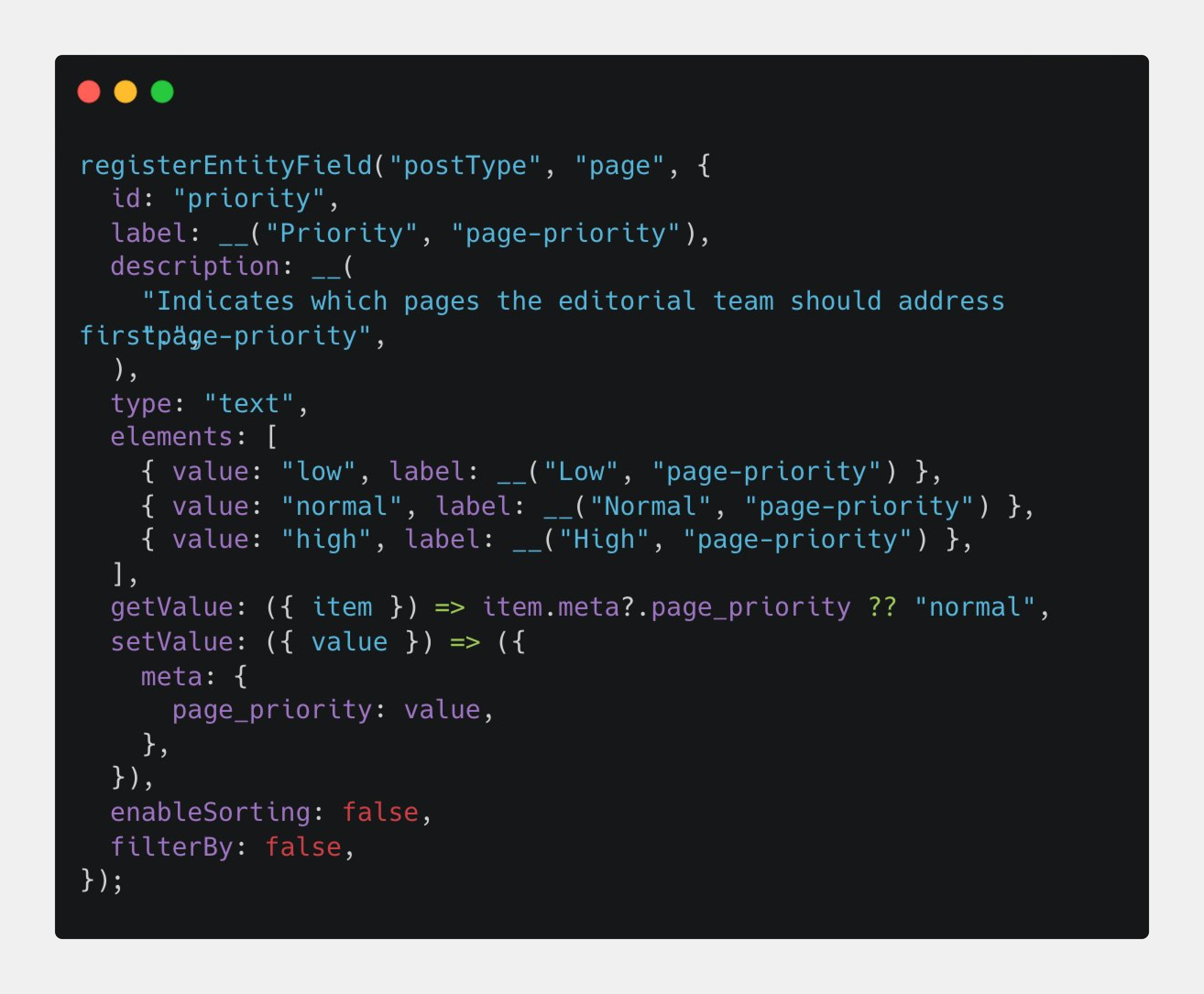
If you’d rather see it than read about it, we built a tiny plugin. It adds one Priority field to the Pages screen. Define it once, and it turns up in two places: a column in the list, and a dropdown you can edit right there in Quick Edit. We didn’t write it twice.
That’s the whole thing. It’s almost boringly small, which is exactly why it’s worth looking at. Code is on GitHub if you want to poke at it.
Who it’s for
Different people get different things from this.
For merchants and the people using these screens, it’s the everyday: a more modern, consistent interface, views you can shape (choose, reorder, sort, and hide columns), multiple layouts, and room for both simple and complex work. It’s not just nicer to look at. It does more.
For extension developers, today’s model is easy to break in ways you don’t expect: one plugin breaks another, and the cause is buried in the DOM. A model with defined extension points makes those conflicts rare and all but removes the regressions that come from markup shifting under you. And if what you’re plugging in is a whole service (a payment, shipping, or marketing integration that has to fit a merchant’s workflow), the same shared framework is what lets it feel like part of WooCommerce and WordPress, not a separate product bolted on.
For AI-assisted development, a structured, serializable model gives people and tools a real contract: an assistant can find the supported extension points, generate a configuration, and check it. Much safer than writing code against undocumented markup.
For those maintaining the platform, a defined model is what lets us move with confidence. Today even a small change can break an extension leaning on some implementation detail. Lowering that risk is what lowers the cost of moving WordPress and WooCommerce forward at all.
What’s still hard and where we want your input
Now the harder parts. There are real ones, and we’d love your thoughts on them.
There’s design work still to do. The classic screens are old, but they’re solid, and in some spots they still do things the new ones can’t yet. Where do you think DataViews falls short today, and what should we fix first?
The extensibility model isn’t fully shipped. It’s maturing on a schedule, but the pieces developers most need are still landing (GitHub #61084). If one extension point existed today, which one would unblock you?
Adoption isn’t free for the ecosystem. Even once the APIs land, extensions have to migrate, and we won’t reach perfect backwards compatibility. The two models are different enough that some extensions will need changes no matter how much we automate. Both will run side by side through the transition, and some of the old system may never fully retire. Our promise is that we don’t break a working screen: the new experience is something to opt into, not a replacement forced on anyone, and the classic screen stays available until you’re ready. For your extension, what would make migrating worth it rather than a non-starter, and how much of it would we need to automate for you?
Questions we’re already hearing
Does this mean every extension has to be rewritten?
Not to keep working. This is a path, not a cliff: the classic screens keep running, and nothing you’ve shipped stops working the day this lands. But let’s be clear about the other side of it. If you want your extension to work with a DataViews screen, adding a column, an action, or a field there, you’ll likely need to rewrite the part that wires into it, since the old imperative hooks don’t carry over.
I have working PHP admin screens. Do I have to move them to React to stay current?
No. Your existing PHP screens (list tables, custom pages, and the rest) keep rendering exactly as they do now. And here’s some good news that tends to get missed: extending the new screens is mostly PHP, not React. The View Config API, where you register fields, pick which columns show, and set the layouts, is a PHP API. The aim is for most of what extensions need to be doable in PHP, with React or JavaScript only for the harder cases, like a custom field type Core doesn’t ship.
Are we adding another framework for teams to learn?
The aim is the opposite: fewer decisions to remake. There’s a lot to get right: page structure, tabs, cards, save behavior, validation, helper text, field patterns. A strong shared system should make the better path the easier one, instead of a layer on top of everything you already do.
What about engineering concerns around public APIs and stability?
Fair question, and an important one. The public APIs aren’t all final yet, and there’s real work left on stability before they are. We’re doing that in the open and on a schedule: a view-config extension point is targeted for 7.1, and server-side field registration comes after that. If the APIs don’t hold up for what you’re building, tell us early, while it’s still easy to change.
So where do we go from here?
We think WordPress and WooCommerce need a shared foundation. Rebuilding every screen by hand, forever, isn’t much of a plan. And we think DataViews is the best thing to build it on: it’s already in core, it’s already running real screens, and it grows out of the same data model WordPress has always had.
But “we should invest in a shared foundation” and “that foundation should be DataViews” are two different claims. We’re confident about the first. The second is fair to argue with, so if you don’t think DataViews is the answer, the most useful thing you can tell us is what you’d build on instead. Point us at something better. That’s the conversation we’re hoping to have.
So, a few questions we keep coming back to:
- Where would a DataViews-based screen fail your current workflow?
- Which extension point would you need first: fields, actions, filters, layouts, quick edit, bulk edit, or something else?
- What would make the migration work worthwhile for your extension?
- If DataViews isn’t the right foundation, what would you build on instead, and what does it do better?
Leave a comment below. Critical feedback is useful, especially when it includes a real workflow, an extension we can study, or an alternative we should compare.

Leave a Reply