

Reconciling your WooPayments balance has meant exporting CSVs, lining them up against your bank statements by hand, and hoping everything matched, or paying for a third-party plugin to do what really should come built in. We wanted to give you a clearer answer to a simple question: how did my balance get from the start of the period to the end?
Now there is one, right inside your store. A new area under Payments → Reports lets you reconcile a period in a couple of clicks, print a clean summary for your accountant, or export the detail to a spreadsheet, all without ever leaving your WooCommerce admin. Your existing Transactions, Orders, and Payouts screens stay exactly as they are; this is a new area, not a change to what you already use.
It’s rolling out as a beta, and you can opt in whenever you’re ready (more on that below).
See your whole period at a glance: the Balance report
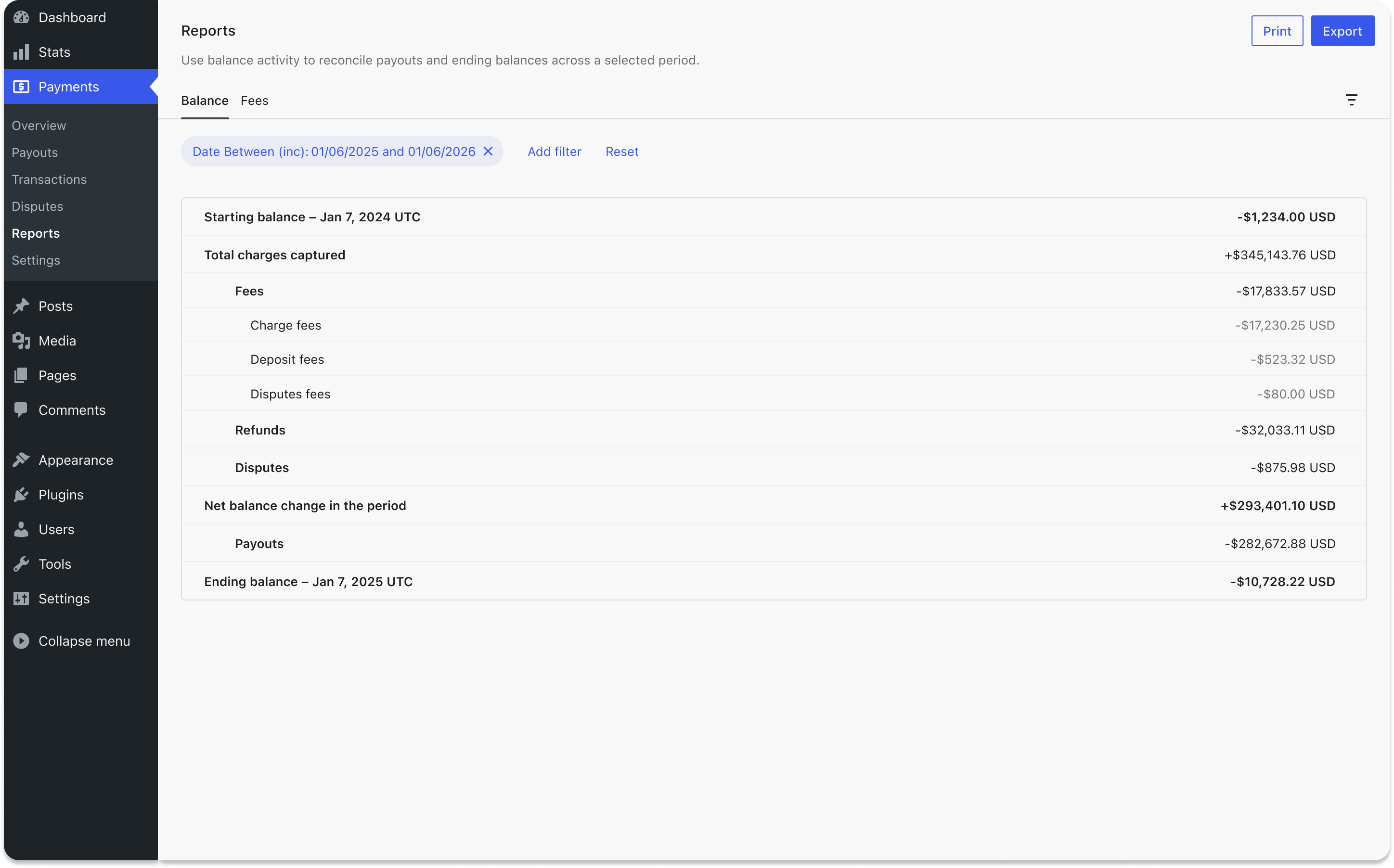
The Balance report walks through your period the way an accountant would read it:
Starting balance → Charges → Fees → Refunds → Disputes → Payouts → Ending balance.
Choose a date range and every line that moved your balance is there, grouped, subtotaled, and adding up to your ending balance. Fees are broken out by type, and payout fees and in-person (Reader) costs get their own lines, so nothing is buried.
Need to share it? The Print button produces a clean, self-contained summary: your WooPayments header, the balance breakdown, and a short disclaimer. It reads as a credible document to hand an accountant or a bank, and you can save it straight to PDF from the print dialog. Prefer the raw data? Export to CSV in one click.
The detail behind every fee: the Fees report
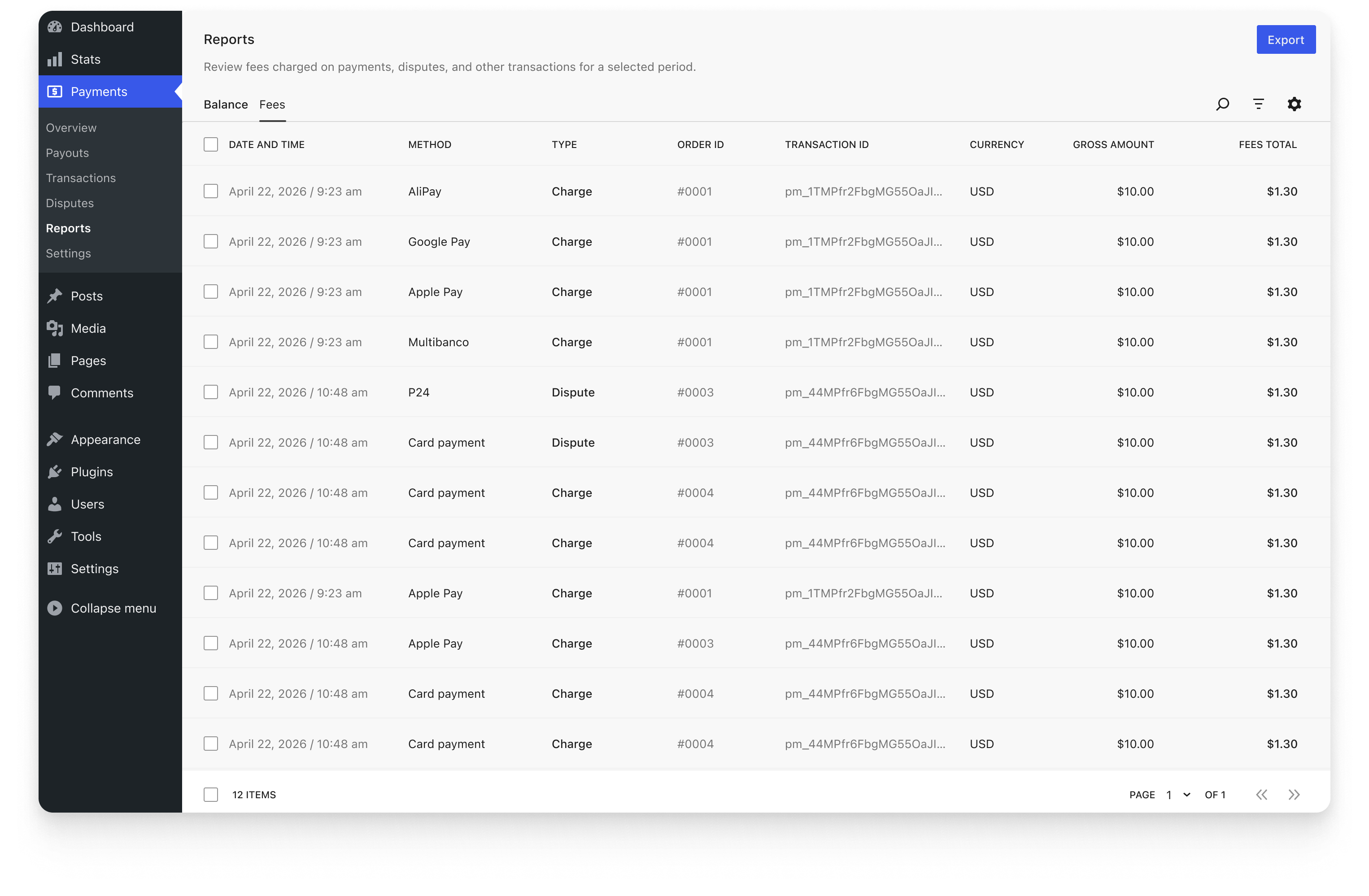
When you want the line items, the Fees report lists each fee-bearing event (a charge, a dispute, a payout) with the columns you’d expect: date and time, payment method, type, order ID, transaction ID, currency, gross amount, and total fees. A few more (product, settlement date, payout ID) are one click away.
Filter by date, method, or type right at the top, then search, sort, and export the whole thing to CSV, complete with your store name, the period, and the totals baked into the file, so it makes sense on its own when you forward it along.
Built to match your Stripe numbers
We built these reports to reconcile against the same figures Stripe uses, so your WooPayments totals line up with your payout deposits and your Stripe Balance report. Periods are calculated in UTC, the same way Stripe does it, so the math agrees.
Because it’s in beta, we’re confident in the core numbers but still smoothing out the edges. You may run into the occasional edge case. If a figure ever looks off, tell us: that’s exactly what this beta is for, and it helps us get it right for everyone.
Want to try it? Opt in
Reconciliation Reports is available now in WooPayments 10.9 as a beta, and it’s rolling out gradually. If you’d like it today, you (or your developer) can switch it on with a small snippet. Add it through a code snippets plugin or your theme’s functions.php:
add_filter( 'pre_option__wcpay_feature_reports_area', fn() => '1' );
Comfortable with WP-CLI? This does the same thing:
wp option update _wcpay_feature_reports_area 1
Finally, if you are not comfortable adding code snippets or manually updating options, you can contact our support team, who can enable the reports for you.
Once it’s on, you’ll find everything under Payments → Reports. We’re also enabling it more broadly as we go, so even if you’d rather wait, it’ll reach you before long.
What’s next is up to you
This is the first version, and where it goes next depends on what you tell us. A few ideas we’re weighing: include scheduled exports, quick links from each balance line to the matching transactions, multi-currency support, and a dedicated payout reconciliation view for stores on automatic payouts. Nothing here is set in stone, so let us know what would help most, and we’ll focus on that.
Tell us what you think
You’ll find a quick feedback control right inside the report (a thumbs up or down with room for a comment), and we read every one. Reconciliation, payouts, financial reporting: if it’s part of running your store, we’d genuinely love to hear what’s working and what you’re still missing.
Leave a Reply